
Part of our Getting On The Air: Bands, Operating, and Making Contacts guide.
DXing gets treated online like it requires a mountaintop, a tower and a stack of beams. Plenty of serious DXers work rare entities from a wire antenna and 100 watts, and timing, band choice and patience matter more than station size. As of November 2026 I’ve worked 133 countries, mostly on SSB and FT8. This guide covers the whole loop: finding and working the DX, getting through the pileup, and getting the contact confirmed so it counts.
Jump to: DXing with a modest station · Split operating and pileups · QSLing for DXCC
DXing 101: Working Rare Entities Without a Big Antenna Farm
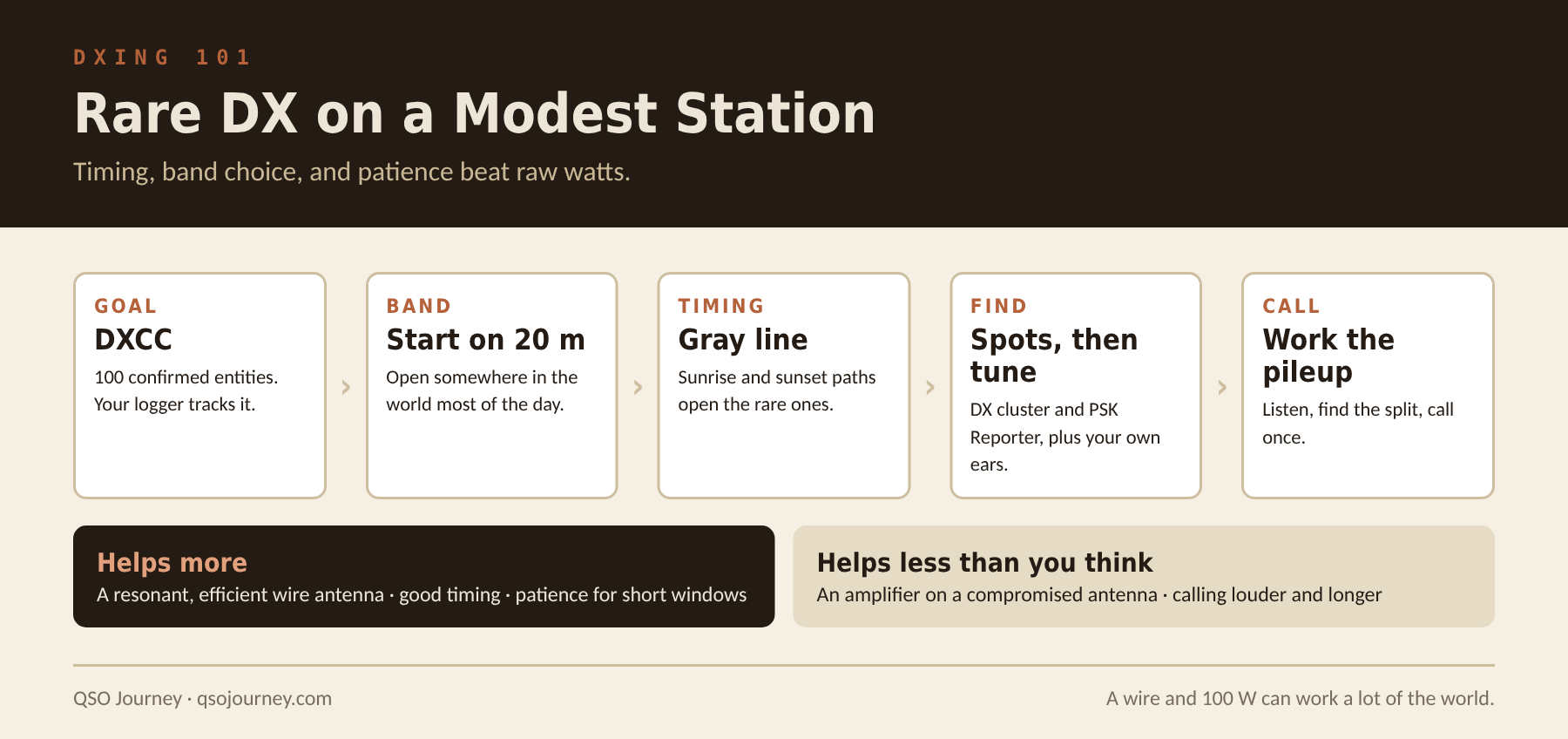
- Start with a DXCC goal. DXCC tracks confirmed contacts with distinct entities, which are close enough to countries for a beginner. Aiming for 100 confirmed gives DXing a concrete target instead of chasing whatever’s loud, and most logging software tracks it for you.
- Band choice beats power. 20 meters is open somewhere most of the day and works with modest antennas. Knowing the solar cycle and gray line timing will get you more rare contacts than an amplifier.
- Use spots, but listen first. DX cluster spots and PSK Reporter show where activity is in near real time, but tune around on your own too. Some of the best DX is a station calling CQ that nobody has spotted yet.
- Be patient. Some entities are only workable during short windows a few times a year.
A resonant, efficient wire antenna beats a compromised one every time, regardless of power. If you want to see how far you’re really getting out, see How to Test Your Antenna and Radio’s Real Reach, and when you’re ready to go bigger, Building a DX Antenna Setup.
Split Operating and Pileups: How DXpeditions Actually Work
Tune into a big DXpedition and you’ll hear a wall of stations calling at once while the DX station calmly works through them one at a time. That’s split operating, and understanding it is the difference between getting through in ten minutes or never getting through at all.
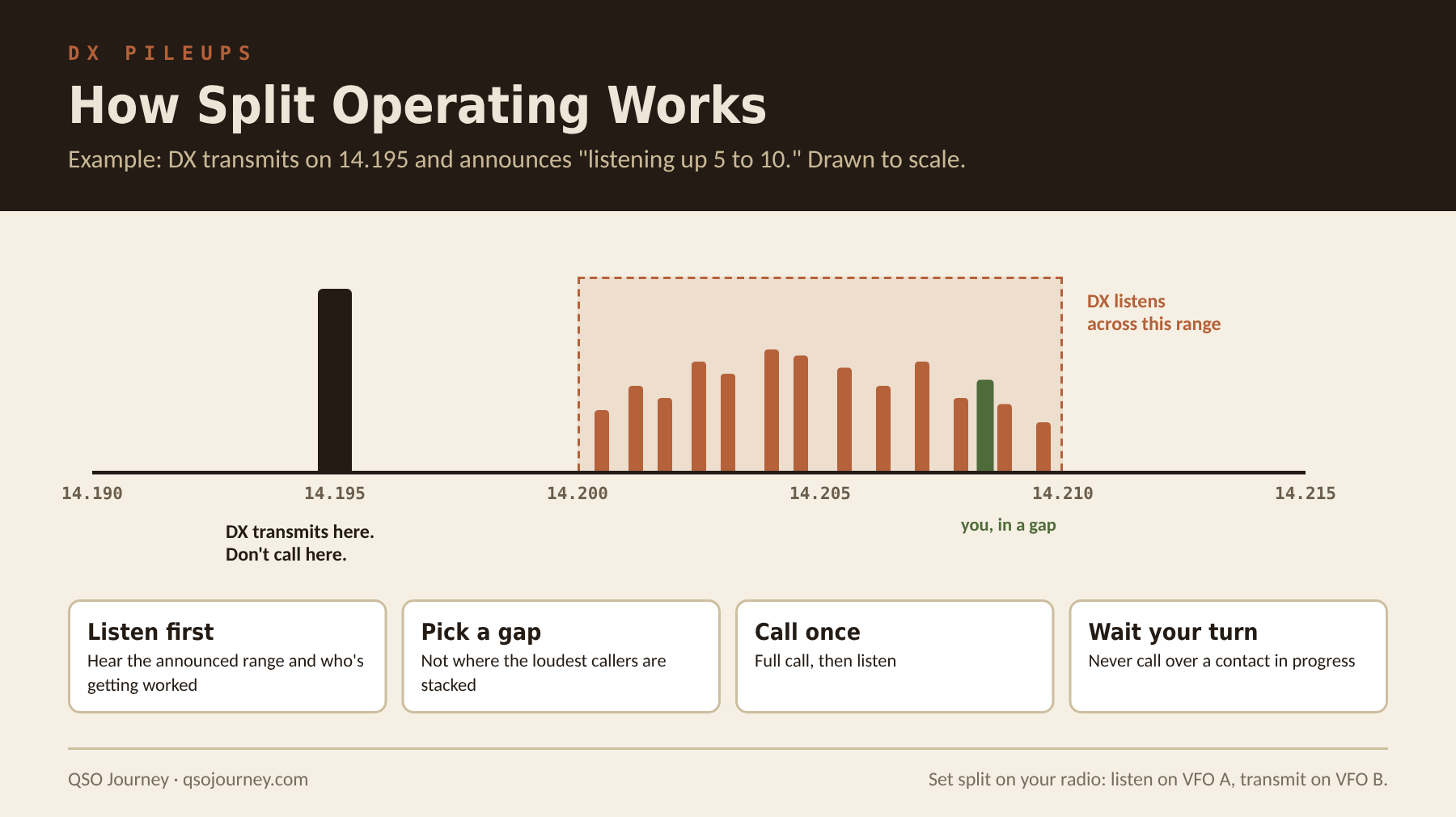
A DX station operating split transmits on one frequency and listens on a different one, usually a few kHz up. That keeps its own frequency clear and spreads callers across a range. If you call on the DX station’s transmit frequency instead of its listening range, you’ll never be heard, no matter how strong you are.
Setting up split on your radio
Listen for a few minutes first. The DX station usually announces its range (“up 5 to 10”), or you can work it out from where answered callers are. Then set VFO A to the DX station’s frequency, VFO B to where you’ll call, and press SPLIT so the radio receives on A and transmits on B. Many radios have a quick-split key that puts B a few kHz above A in one press. Before you call, confirm the split indicator is on, because transmitting on the DX frequency by mistake is the most common pileup error. FT8 DXpeditions use their own version, Fox and Hound mode in WSJT-X, where callers stay above 1000 Hz and the DX station moves you down when it answers, so read the expedition’s instructions first.
Working the pileup
- Call once, cleanly, with your full call sign. Repeating it three times eats the DX station’s listening window.
- Pick an open spot in the listening range instead of calling where the loudest stations cluster.
- Learn the DX station’s pattern. Some work call sign fragments, some go by geography, and their rhythm tells you when your moment is coming.
- Don’t call over someone else’s exchange. Wait for it to finish and call clear.
Split isn’t bureaucracy. With hundreds of stations chasing a rare DXpedition, it’s the only practical way to work through that much demand in a limited window. Remember that ITU regions also push DX stations into split on some bands, like 40 meter phone with Europe, which I explain in ITU Regions.
QSLing for DXCC: Paper Cards, LoTW and eQSL
Making the contact is one thing. Getting it confirmed in a form that counts toward an award is a separate skill most newer hams don’t think about until they’re chasing their first hundred entities. The three main confirmation methods aren’t interchangeable.
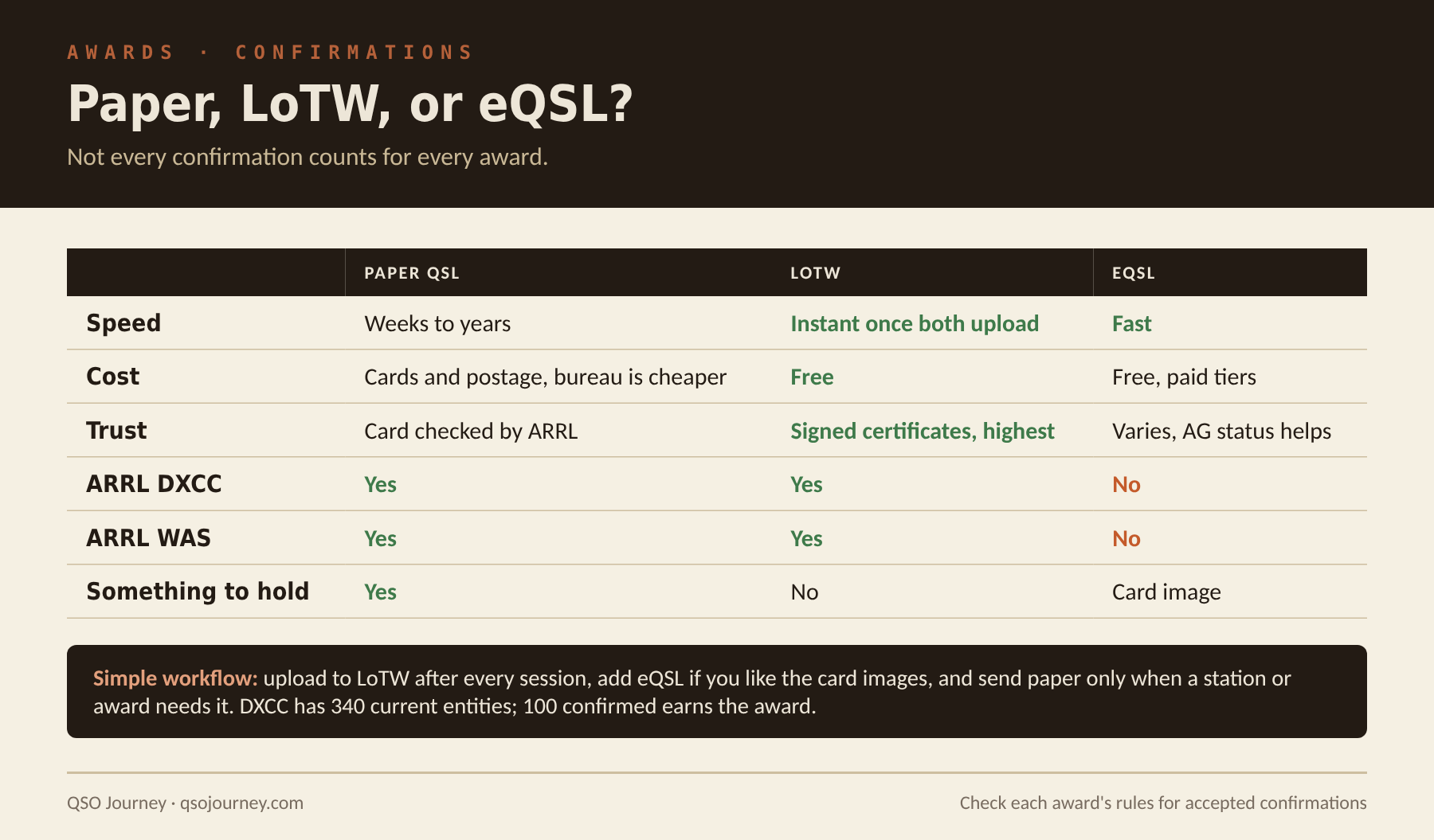
- Paper QSL cards list the date, time, band, mode and report, and go out direct or through a QSL bureau, which batches cards by country to save postage but is slow. They’re the only confirmation you can hold, and some older or specialty awards still require them, but cost and time pushed most everyday confirming electronic.
- LoTW (Logbook of The World) is the ARRL’s free system and the backbone of modern DXCC. Both operators upload logs signed with a certificate tied to their license, and a match on both ends confirms instantly. It’s considered the most trustworthy method and is how most active DXers and contesters confirm today.
- eQSL is older and generates a card image when both logs match. It’s popular and easy, but only verified members carry Authenticity Guaranteed status, and DXCC doesn’t accept eQSL at all, a common point of confusion.
DXCC is earned by confirming 100 or more entities from the ARRL’s current list of 340, through LoTW or paper cards submitted for card checking. The workflow that works: log every contact carefully, upload to LoTW as your primary method, use eQSL if you like the card images, and chase paper cards only for stations without LoTW or awards that need them. I confirm everything through LoTW, QRZ and HRDLog. Logging software that uploads automatically makes all of this painless, which I cover in Logging Software Compared.
Related reading: Ham Radio Awards Beyond DXCC · The Pay to Confirm Problem · Contests Worth Your Weekend