
Part of our Digital Modes: FT8, Winlink, DMR, APRS, and the Software Behind Them guide.
If you’ve heard hams talking about FT8, you’ve heard about WSJT-X even if the name didn’t come up. It’s the free software that runs FT8 and a family of related weak-signal modes, and it’s one of the most influential pieces of software in modern amateur radio. Here’s what it is, how FT4 fits in, and whether the JTDX fork is worth your time. When you’re ready to wire it all up, my step-by-step WSJT-X, GridTracker, HRD and TQSL setup gets you to a station that logs itself.
Jump to: What WSJT-X is · The modes it runs · FT4 · JTDX vs WSJT-X
What Is WSJT-X?

WSJT-X is a free, open-source program originally developed by Nobel laureate Joe Taylor, K1JT, along with a team of contributors. “WSJT” stands for Weak Signal communication by K1JT. It runs on Windows, macOS and Linux, and it turns your computer and radio into a system that decodes signals buried so deep in the noise you often can’t hear them at all.
It connects to your radio in two ways: it exchanges audio with the radio (through a sound card or the radio’s built-in USB interface), and it controls frequency and transmit keying through CAT control. Your computer decodes incoming signals and shows them on screen, and you click to reply.
Why it changed the hobby
FT8 exploded because it lets modest stations do remarkable things. With a few watts and a simple antenna, operators routinely work across oceans on bands and at times when voice would be impossible. The exchanges are structured and largely automated, so the software handles timing and the standard back-and-forth while you supply the clicks. That makes it a favorite for people with limited antennas, apartment dwellers, QRP operators and anyone chasing new countries or grid squares. It’s also a great way to see whether a band is open, since a quiet-sounding band can be full of FT8.
WSJT-X rarely works alone. It feeds decodes and contacts to companion programs like JTAlert and GridTracker, and reports spots to PSK Reporter so you can see where you’re being heard. I cover all three in FT8 Helper Apps: GridTracker, JTAlert and PSK Reporter. Best of all, it’s completely free.
The Modes WSJT-X Runs
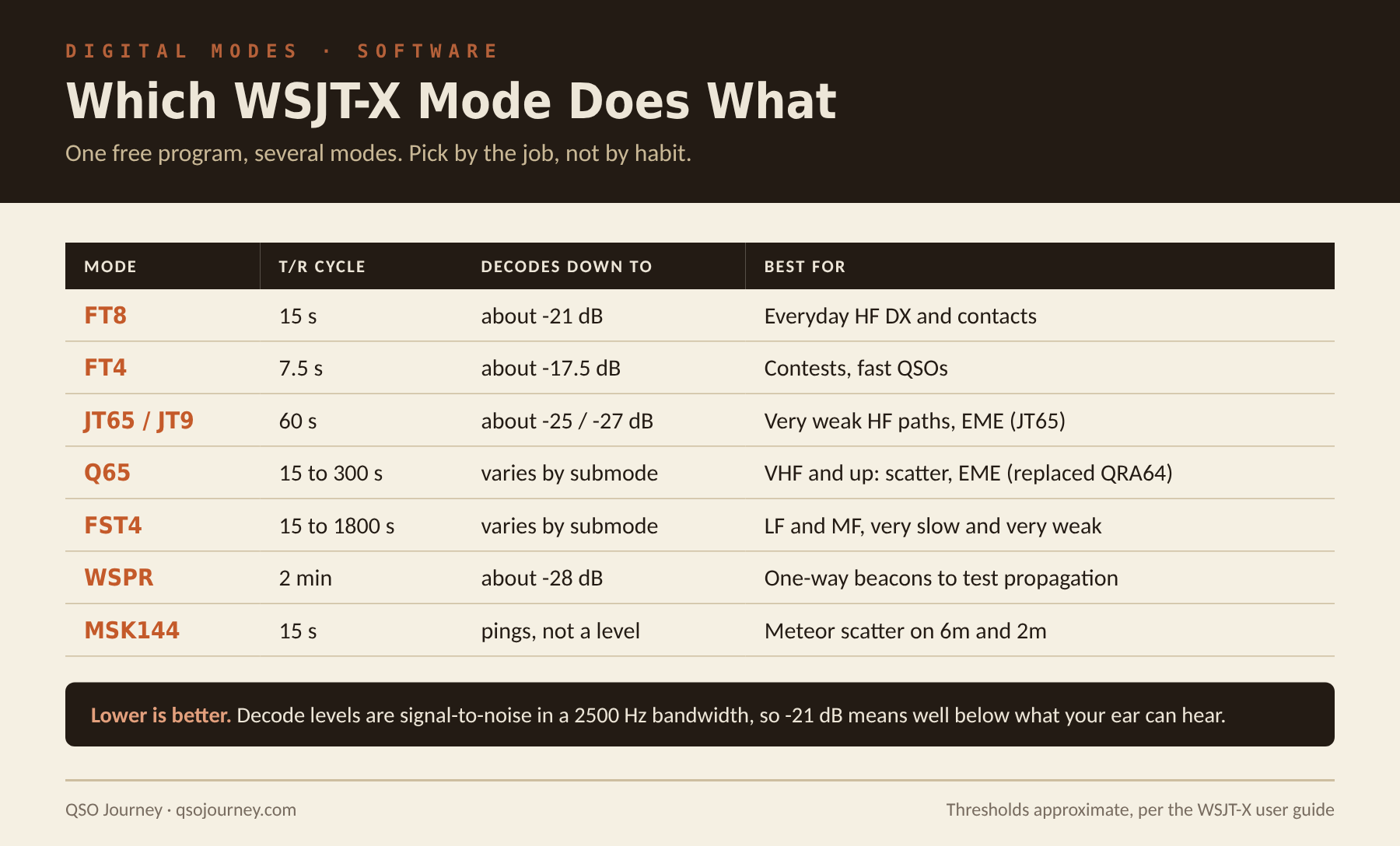
- FT8 is by far the most popular. It uses 15-second transmit and receive cycles and structured, automated exchanges to make contacts under terrible conditions with very little power.
- FT4 is a faster version aimed at contesting (more below).
- JT65, JT9, Q65 and FST4 are older or specialized weak-signal modes. Q65 replaced QRA64 and is popular for VHF scatter and moonbounce, while FST4 is built for very slow, very weak signals on the LF and MF bands.
- WSPR (pronounced “whisper”) is a beacon mode for studying propagation rather than making two-way contacts. I use it to test an antenna’s real reach.
- MSK144 is for meteor scatter.
FT4: FT8’s Faster, Less Popular Cousin
FT4 barely gets mentioned even though it ships in the same software and takes zero extra setup to try.
The one real difference: speed
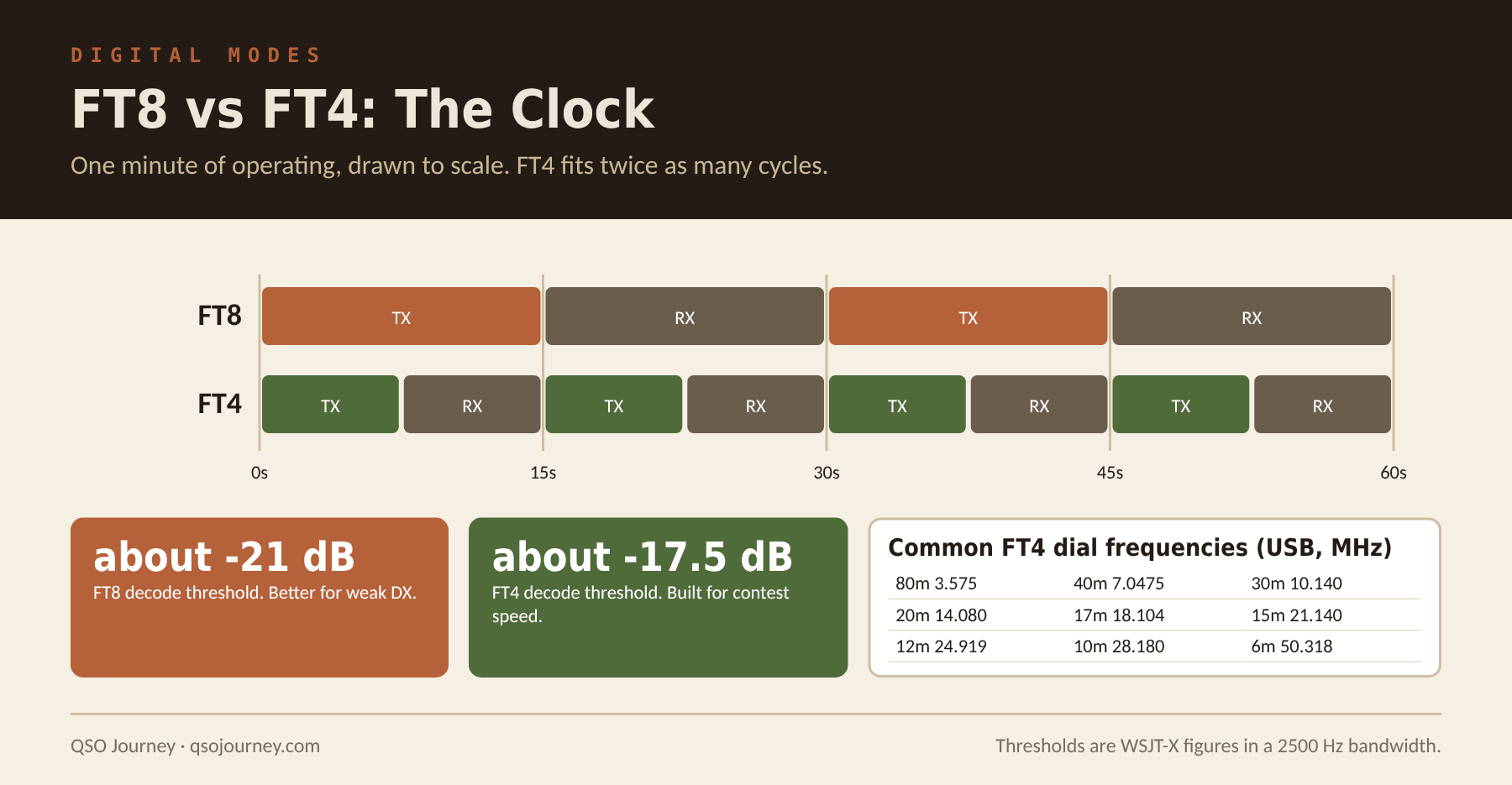
FT8 runs on a 15-second cycle. FT4 compresses that to 7.5 seconds, which doubles your theoretical QSO rate when conditions cooperate. That single change is the reason the mode exists. The WSJT-X team built it with contesting in mind, where working through a pileup faster matters more than squeezing out the last few dB of weak-signal performance.
What you give up
FT4 is meaningfully less sensitive than FT8. It can’t pull as weak a signal out of the noise, and it’s more sensitive to timing drift and keying issues on your end, since the decoder has less time per cycle. On a marginal path where FT8 squeaks out a decode, FT4 often won’t. That’s backwards from what most casual DX chasing wants, which is why FT8 dominates while FT4 stays niche.
Where FT4 shines, and where to find it
Dedicated FT4 contests exist because the faster cycle rewards contest-style operating. If you enjoy the contesting side I cover in Contesting 101 and FT8 Contesting, FT4 is worth having in your back pocket. Outside a contest, the quieter FT4 segments can work in your favor, with less congestion and less chance of getting stepped on.
FT4 has its own watering holes, separate from FT8, and WSJT-X loads them when you switch modes. The common dial frequencies (USB) are 3.575, 7.0475, 10.140, 14.080, 18.104, 21.140, 24.919, 28.180 and 50.318 MHz. During a big contest activity spreads beyond these, so watch the waterfall. Keep your computer clock synced, too. With only 7.5 seconds per cycle, a clock a second or two off costs you more decodes on FT4 than on FT8. Trying it is a dropdown in WSJT-X, so there’s no reason not to during the next FT4 contest.
JTDX vs WSJT-X: Is the Fork Worth Switching To?
WSJT-X runs FT8 on my IC-7300 Mark II, which handles most of my digital work, and it’s my default recommendation for anyone starting out. JTDX is a fork of the same codebase that’s been around long enough that people regularly ask if it’s worth switching.
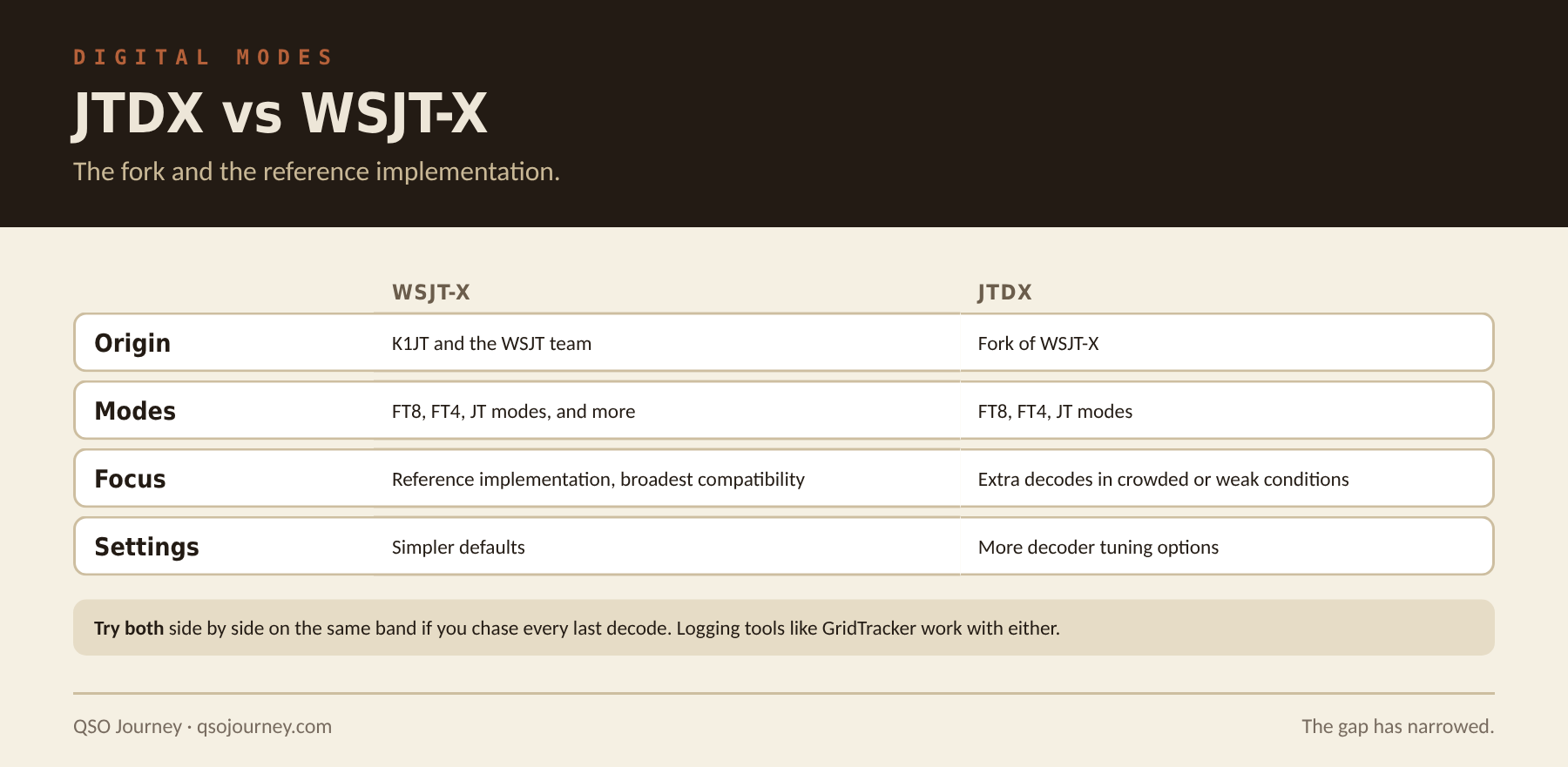
JTDX is maintained by a separate development team focused on squeezing more decodes out of marginal signals. Both programs support FT8, FT4 and the older JT modes, and both work with the same logging and helper tools, so switching doesn’t mean rebuilding your digital station.
JTDX’s main claimed advantage is decoder sensitivity in crowded or weak conditions. In practice the gap has narrowed a lot as WSJT-X has kept developing, and most casual operators won’t notice a dramatic difference day to day. JTDX’s interface is also more configurable in places, which appeals to operators who like to tune decoder settings by hand.
I run WSJT-X because it’s the reference implementation, has the widest compatibility with the rest of the ecosystem, and gets the most active development from the original K1JT team. If you’re a serious weak-signal DXer chasing every last decode in a crowded pileup, try JTDX side by side. For everyone else, I wouldn’t switch just for the sake of it.
Trying JTDX without breaking your setup
- Install JTDX alongside WSJT-X. Both can live on the same computer, but run only one at a time, since they compete for the same radio and audio devices.
- Copy your key settings over: radio model, COM port, audio devices, callsign and grid.
- Point your logging and helper tools, such as GridTracker, at whichever program you’re running.
- Compare decode counts on the same band at similar times. One evening isn’t a fair test.
JTDX is mainly available for Windows and Linux, so Mac users have fewer options. New protocol updates and modes usually arrive in WSJT-X first, so check JTDX release notes before a contest or event that depends on the latest version.
Related reading: Getting on FT8 with the IC-7300 Mark II · Getting on FT8 with the FTX-1 Optima · PSK31, RTTY, Olivia, MFSK and FreeDV