
Part of our Handheld Radios (HTs) guide.
A handheld works fine out of the box, but a few cheap upgrades make it dramatically more useful: an antenna that actually reaches the repeater, a way to carry it without holding it to your face, a battery plan that survives a long day or an outage, and a programming cable that doesn’t fight you. These are the upgrades I’d buy first, in order of payoff. If you’re still choosing the radio, start with What I Look For in a Ham Radio HT.
Jump to: Antenna · Speaker mic, clip and extras · Batteries · Programming cables
The Antenna: The Cheapest Performance Boost You Can Buy
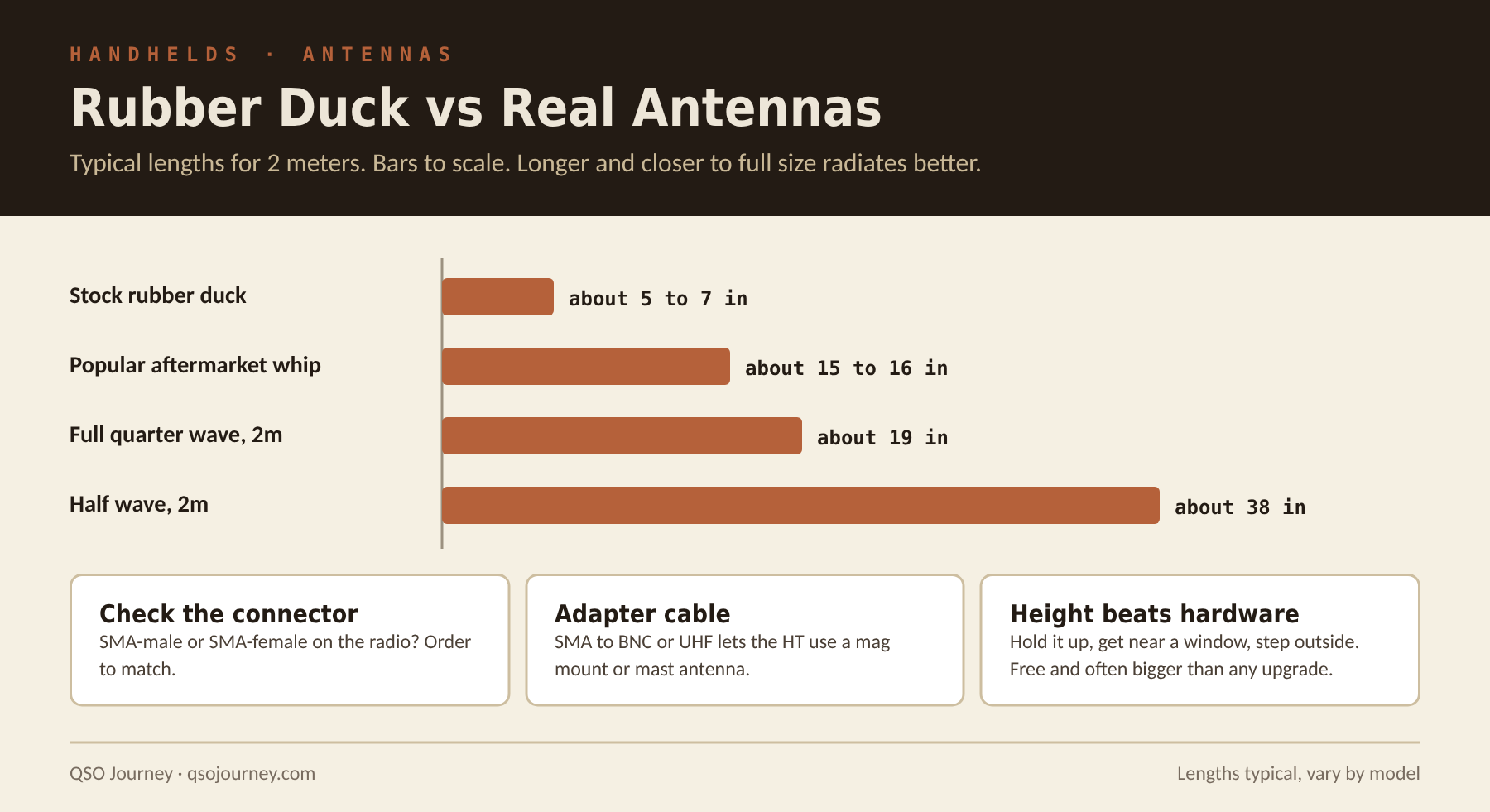
Every HT ships with a rubber duck: a short, coil-loaded antenna built to be compact and durable, not efficient. A longer, properly sized antenna radiates and receives noticeably better, and many operators find it opens repeaters the stock duck couldn’t reach.
- A longer dual-band whip is the simplest upgrade, usually a direct SMA swap for a few dollars.
- A tape measure or roll-up Yagi trades all-around coverage for real gain when you know roughly where the other station is, handy for a difficult simplex contact.
- An SMA to BNC or SMA to UHF adapter cable lets you connect to a mag-mount on a car roof or a temporary mast, turning the HT into something close to a mobile station.
- Check the connector first. HTs use SMA-male, SMA-female, or Kenwood and Motorola two-pin styles inconsistently between brands, and the wrong one won’t fit.
One thing beats any antenna: height and a clear path. Holding the radio up instead of at your hip, or standing at a window instead of deep inside a building, does more than most antenna purchases. My Radio Horizon Calculator shows why.
Speaker Mic, Belt Clip and the Extras

- A speaker mic lets you clip the mic to a collar or pack strap while the radio stays on your belt or in a pocket. It’s cheap and probably the accessory that gets used most. My TH-D75A rides on my battle belt with one.
- A real belt clip or case. Stock clips on budget HTs are flimsy and snap at the worst moment. A sturdy aftermarket clip or a proper case also protects the buttons and finish.
- Nice to have: an earpiece or headset for privacy and noisy places, a spare battery to double your operating time, a car charger or USB-C cable, and an antenna adapter for mobile or base antennas.
HT Batteries: OEM Packs, AA Cases and Eneloops
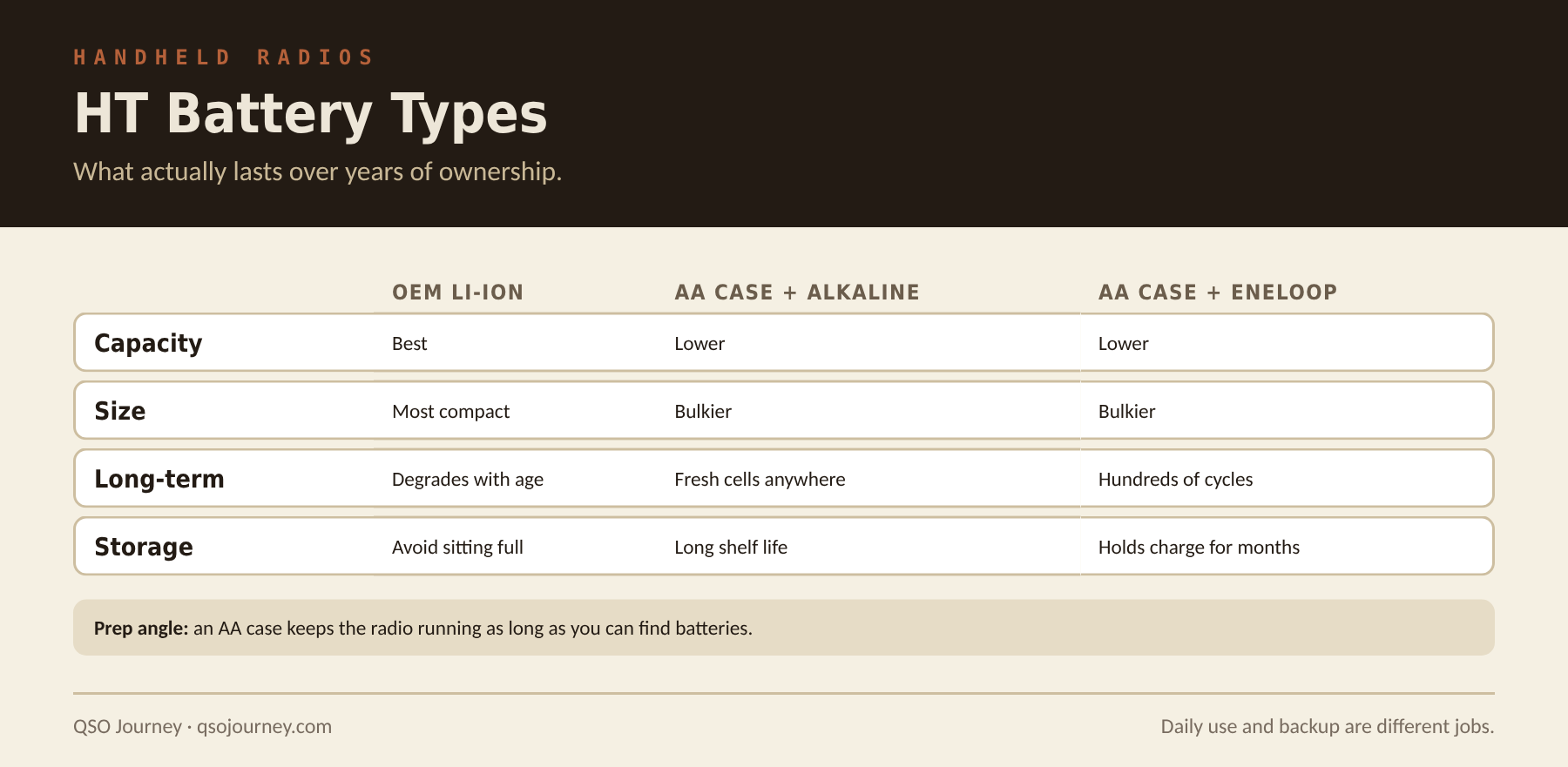
- OEM Li-ion packs have the best capacity and the most compact form, and they’re the right choice day to day. They degrade with age no matter how you treat them, especially if stored full. Cheap aftermarket packs are hit or miss, so stick with genuine replacements.
- An AA battery case trades capacity for the ability to run on batteries from any store. For preparedness that’s valuable: the radio keeps going as long as you can find AAs.
- Eneloops are the best fill for an AA case. They hold charge for months in storage, handle hundreds of cycles, and avoid buying alkalines over and over.
Care: store Li-ion packs around half charge if they’ll sit for weeks, keep them out of hot cars (heat ages lithium faster than anything), pull alkalines out of the case and rotate them yearly, top up Eneloops every few months, and date your packs. A swollen pack is a safety problem: stop using it and recycle it. More on rotation in storing and rotating batteries.
Programming Cables: Which Ones Work Reliably
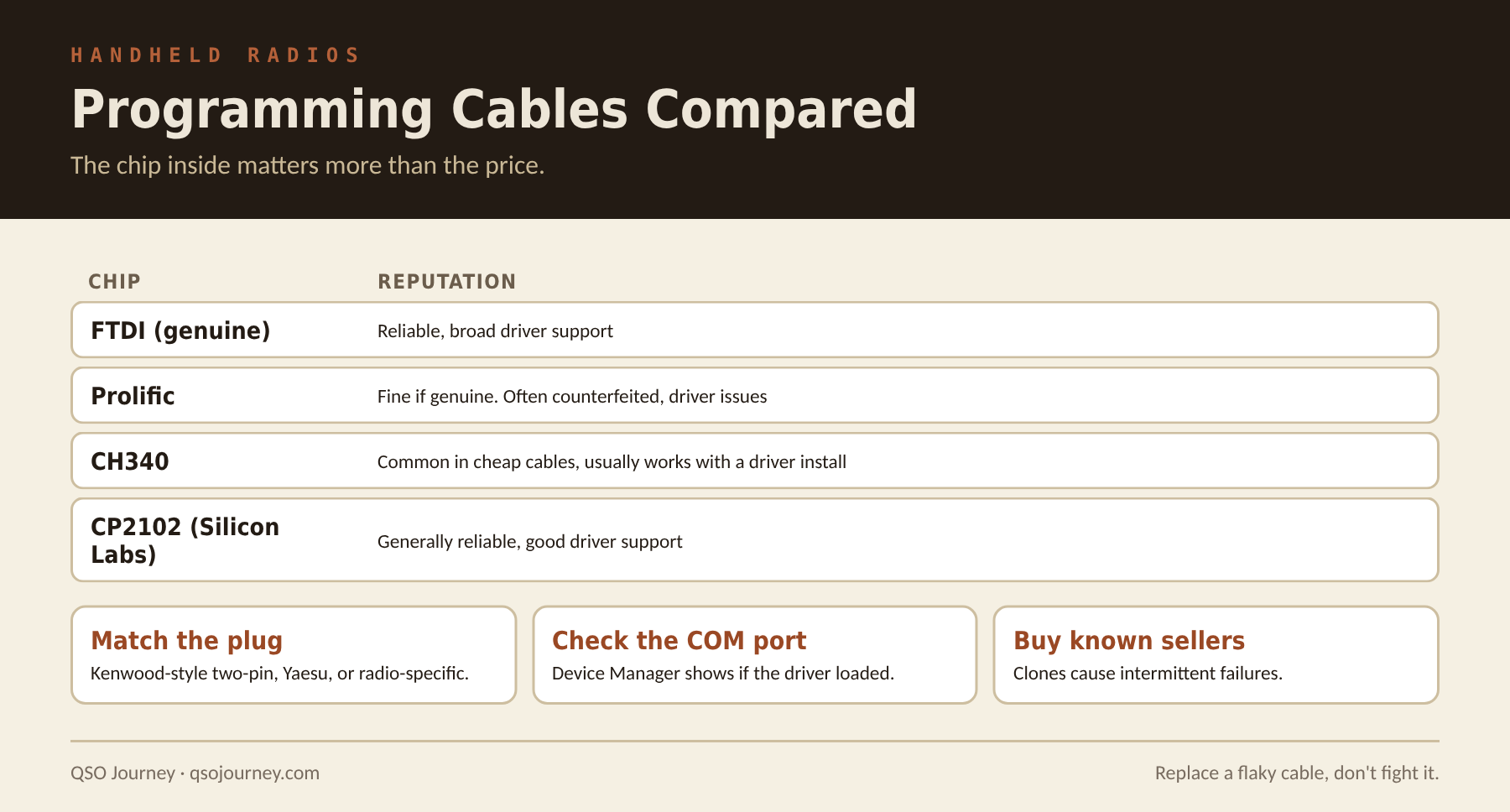
Once you have more than a few channels, programming from the keypad gets old fast. A cable and free software like CHIRP make it a quick computer task. The catch is the USB-to-serial chip inside the cable, which varies enormously between cables that look identical.
| Chip | What to expect |
|---|---|
| Genuine FTDI | Reliable, broad driver support on Windows, Mac and Linux. Counterfeits are common in the cheapest cables. |
| Prolific | Fine when genuine, but heavily counterfeited, and older drivers clash with newer Windows. |
| CH340 | Common in budget cables. Usually works once the driver is installed. |
| CP2102 (Silicon Labs) | Generally reliable with good driver support. |
| Radio-specific USB | Some newer radios program over a plain USB-C cable with no adapter chip. |
I buy cables sold specifically for CHIRP from sellers with a track record, rather than the cheapest listing. If a cable gives you driver headaches on a fresh install, it’s probably not a genuine chip, and replacing it is faster than fighting it. If it won’t connect:
- Confirm a COM port appears in Device Manager (Windows) when you plug it in, and select that exact port.
- Push the plug fully into the radio. Two-pin Kenwood-style plugs often need a firm push.
- Turn the radio on, volume up, and read from the radio before writing to it.
- Try another USB port, directly on the computer rather than a hub.
Then build your channel list with my CHIRP File Builder, or follow programming a UV-5R with CHIRP.