

Part of our Emergency Communications and Preparedness guide.
If you have spent any time around preparedness groups on HF, you have heard someone mention CommStat. AmRRON, GhostNet, and MAGNET all use it, along with regional JS8Call groups and more and more club comms plans. It is also one of the most misunderstood tools in the hobby, because it has changed hands and changed names several times in just a few years. This is everything I know about it in one place: what it is, how it works, why it matters, how people actually use it, what you need to run it, and how the versions differ.
What CommStat Is
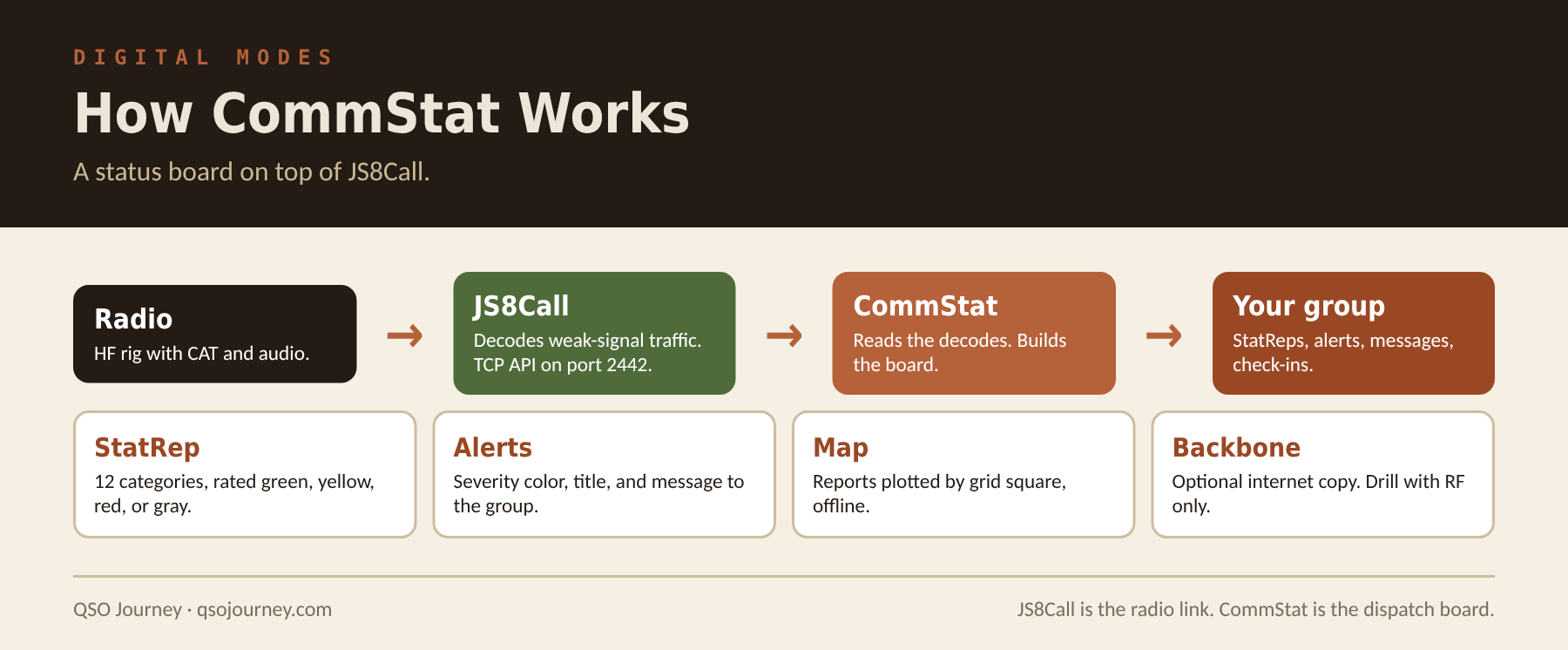
CommStat is a free, open-source companion program for JS8Call. JS8Call gets keyboard messages across HF when signals are barely above the noise. CommStat sits on top of it and turns that traffic into a status board for a group. Instead of reading a scrolling wall of text and trying to remember who said what, you get one screen that shows who has reported in, where they are, how things look in their area, and what messages and alerts are moving through the group.
The simplest way I can put it: JS8Call is the radio link, and CommStat is the dispatch board. It does not replace JS8Call and it does not touch your radio directly. Everything still goes out over the air as normal JS8 traffic, which means any station running plain JS8Call can still read it.
How It Works
JS8Call Does the Radio Work
JS8Call has a built-in TCP API, normally on port 2442. When you turn it on, other programs on the same computer (or your local network) can read what JS8Call decodes and hand it messages to send. CommStat connects to that API. Every decode JS8Call hears gets passed to CommStat, and CommStat picks out the traffic it understands: status reports, alerts, group messages, and net check-ins. When you send something from CommStat, it builds the message in a standard format and hands it back to JS8Call to transmit.
Traffic is addressed to JS8Call group callsigns, the ones that start with an @ sign. Current CommStat ships with the MAGNET, AMRRON, and PREPPERNET groups already set up, and you can add as many of your own as you want, then filter the whole display down to the group you are working.
The StatRep Is the Heart of It
The core of CommStat is the StatRep, short for status report. Current versions use the AmRRON StatRep 5.1 form. Each report carries a header (who it is from, priority, a report ID, state, and grid square) and then rates twelve things about the sender’s area:
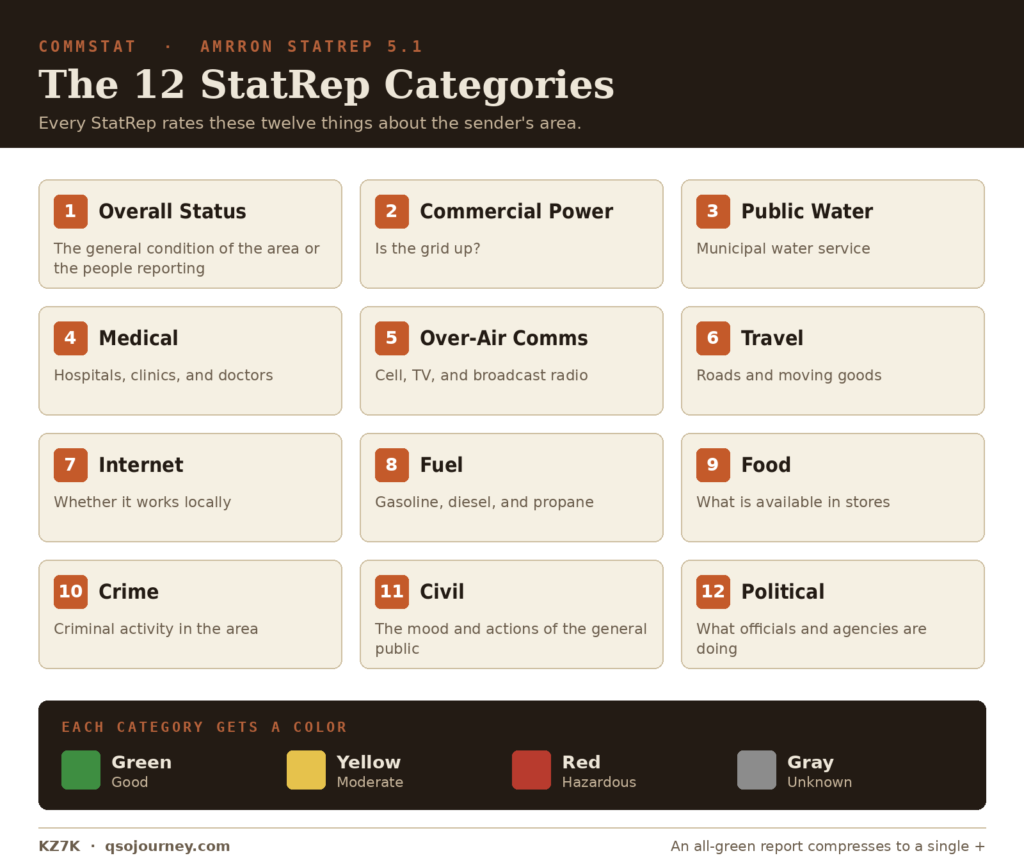
Each category gets a color: green for good, yellow for moderate, red for hazardous, and gray for unknown. That is the whole trick. A report that says “power red, water yellow, everything else green” from a grid square 90 miles away tells you more in one line than five minutes of voice traffic, and it does it in a format every station reads the same way.
The format is also built to be short on the air, which matters on a slow mode like JS8. In current CommStat, an all-green report compresses down to a single plus sign. Only the categories that are not green need to be spelled out. Short messages go out faster, use less battery, and have a better chance of getting through on a marginal band.
Alerts, Messages, and Check-Ins
StatReps are the main event, but current CommStat handles more than that:
- Group alerts: short, high-visibility notices with a severity color (yellow, orange, red, or black), a title, and a message. These are for “everyone needs to see this now” traffic.
- Group and direct messages: plain text to the whole group or to one station, with a contacts list built from the traffic you have received.
- Net check-ins: a check-in workflow so net control can see and review who showed up.
- Live map: every report is plotted by grid square, with offline maps so the map keeps working when the internet does not.
- Extras: band conditions, a propagation map, optional QRZ lookups, news feeds, and JS8Call’s email and SMS gateway through APRS.
Two Paths: RF and the Backbone
This is the biggest change in the last year, and the one people most need to understand. Current CommStat can send every StatRep, message, and alert two ways at once: over the air through JS8Call, and over the internet to a private backbone server. Other CommStat users pull down anything they missed from that server, and it shows up on their board as if it came in over the radio. If both copies arrive, the duplicate is thrown away.
That is a real improvement for a group that just wants reports to get through. A station that was off the air, or had a bad path, still catches up. A station outside a disaster area with working internet can effectively forward traffic into the dark zone over RF. The data is not published on a public website the way PSKReporter or Winlink position reports are, and AmRRON’s write-up notes you still need a radio station connected to use it.
Here is my caution, and I feel strongly about it. If you are using CommStat to test whether your network actually works with no infrastructure, the backbone can hide the answer. A report that arrived over the internet looks the same on the board as one that came over HF. AmRRON’s version of this lets you pick between sending with internet and RF together or RF only. When you are drilling, pick RF only, or unplug the internet on the CommStat computer, and see what really makes it across. Then you know.
Why It Matters
When the grid goes down, the most valuable thing you can have is an accurate picture of what is happening around you. I made that case at length in Why HF Radio Matters Most When the Grid Goes Down. HF gets you the reach. CommStat organizes what comes in over that reach so it is usable.

- It standardizes reporting. Twelve categories, four colors, the same for everyone. Nobody has to interpret a rambling report, and nothing important gets left out because someone forgot to mention it.
- It works at the edge of the noise. JS8Call decodes signals you cannot hear, at low power, on battery. Voice nets fall apart long before JS8 does.
- It shows the shape of an event. Plot reports on a map and you can see where the trouble is and where it stops. A ring of red power reports around one area and green everywhere else tells a story nobody had to explain.
- It keeps a record. Every report is logged and stays on the board. You can look back and see how an area changed over hours or days, which beats trying to remember what someone said at 0200.
- It does not need the internet. The backbone is a bonus. Over RF, all it needs is a radio, JS8Call, and a computer.
How It Is Used
On a Regular Net
Most CommStat use happens in normal times, on scheduled nets. A group agrees on a frequency, a group callsign, and a time. Stations send their StatReps and check-ins, and everyone watches the board fill in. AmRRON runs nets like this on its published frequencies. GhostNet, the JS8Call network that came out of S2 Underground, uses CommStat too, and it is built to run without a net control station at all, which suits CommStat well since every station sees the same board. MAGNET, the nationwide HF network for Mutual Assistance Groups, is another network that uses CommStat, and it is one of the groups CommStat comes preloaded with. Plenty of regional groups do the same on their own schedules. In normal times nearly every report comes in green, and that is fine. The point is practice: every operator learns the screens, the report form, and the flow, so none of it is new when it counts.
It also fits naturally into a regional HF net. In What Is an HF NVIS Regional Net? I lay out how CommStat handles status and check-ins while VarAC handles file distribution and FLDIGI with FLMSG carries structured forms. Each tool does one job well.
When Something Happens
When an event hits, the same routine just gets more serious. Stations send StatReps as conditions change, with updates numbered so you can tell the latest from the first. Net control or a group leader watches the map for patterns, pushes alerts when something needs everyone’s attention, and sends requests for information to stations near a trouble spot. Replies come back as messages, and anything secondhand gets labeled as unverified so nobody treats a rumor like a fact.
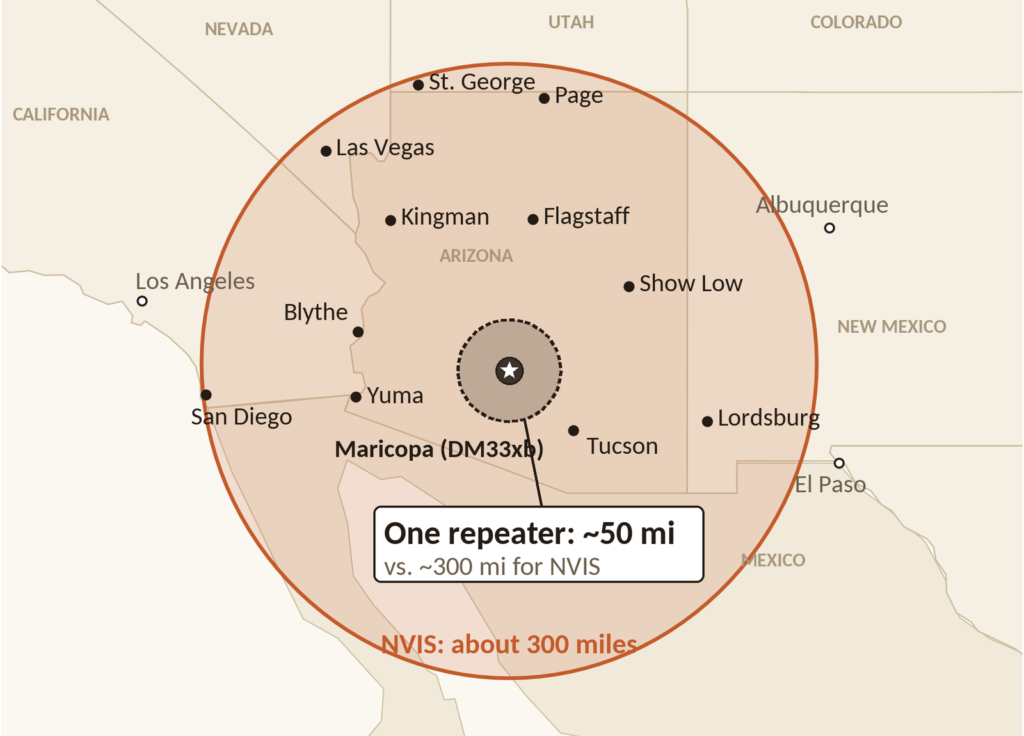
From my station in Maricopa, a 300 mile NVIS circle on 40 or 80 meters covers nearly all of Arizona. If CommStat shows red power in Phoenix and Tucson but green in Flagstaff and Yuma, I know a lot about the size of the problem without a single tower or server involved. Whatever I learn on HF then gets passed down to local VHF, UHF, and GMRS, which is how one CommStat station becomes the news source for a neighborhood.
Reading the Board
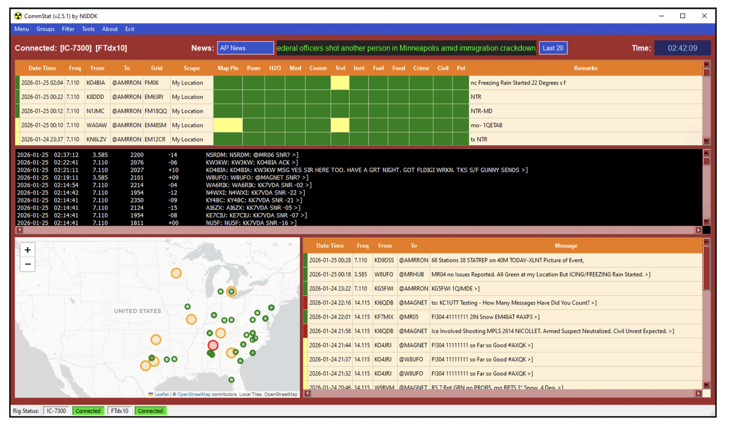
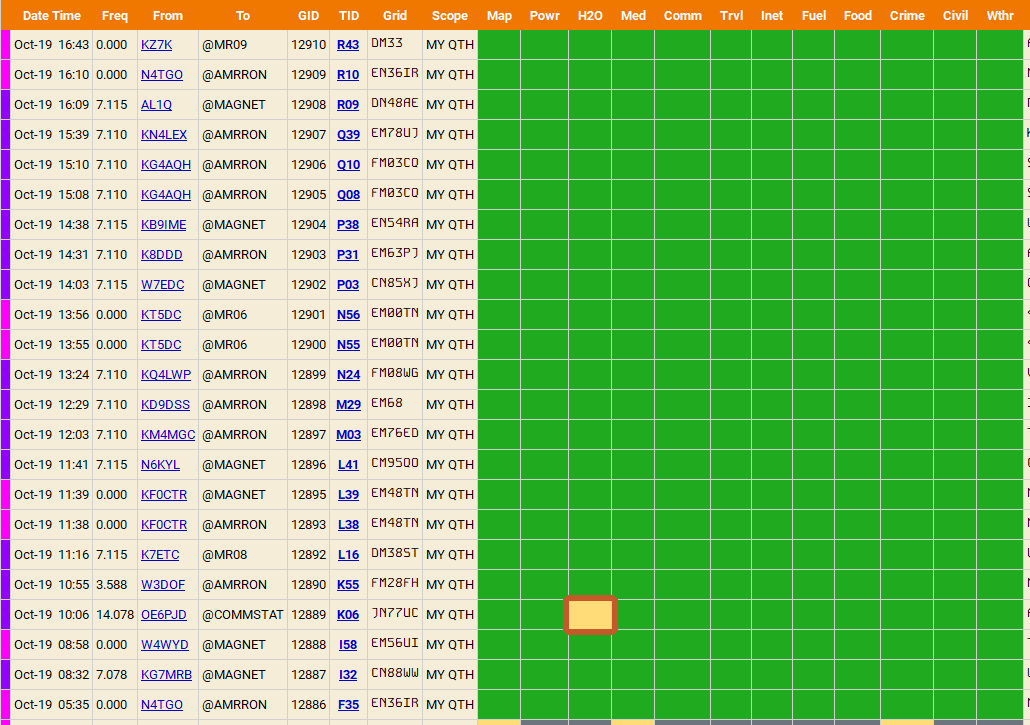
There are three places to look: the main board, one report up close, and the message panel. These screenshots are from an ordinary October day on the air, with AmRRON, MAGNET, and GhostNet traffic all landing on the same screen.
1. The main board. One row per station, newest at the top, with the group it was sent to and the station’s grid square. Each category gets its own colored cell. A screen full of green is a quiet day. When a cell turns yellow, like the outlined water cell here, that station is flagging a concern.
2. One report, up close. Click any row to open the full report. Yellow is a concern, gray is unknown, and the remarks explain why. Clicking that station’s pin on the map pulls up the same report.

3. The message panel. This is where alerts, news relays, requests for information (RFI), and their replies show up. Look at the mix of groups: @AMRRON, @MAGNET, and @GHOSTNET traffic all lands in one list. And look at the GhostNet query marked unverified and not for relay as fact. That label is the habit that keeps a rumor from turning into a fact three relays later.
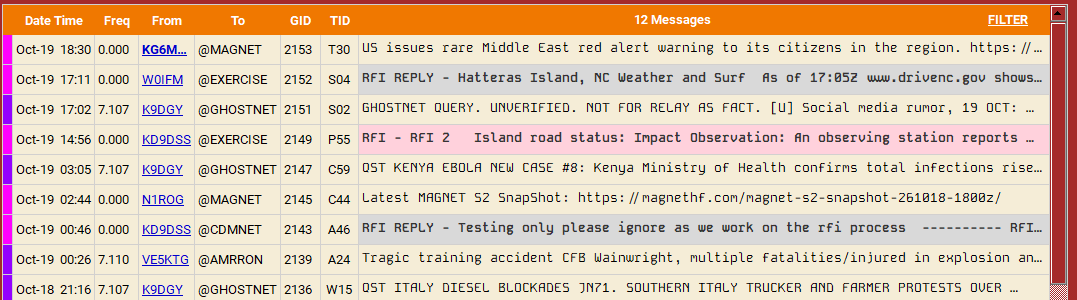
Scan the colors first, read the remarks second, and treat anything marked unverified as a lead to confirm, not a fact.
What You Need to Run It
- A license to transmit. HF JS8 on 80, 40, and 20 meters needs a General class license or higher. Technicians have data privileges on 10 meters. You need no license at all to receive, and a shortwave receiver or an SDR feeding JS8Call will show you CommStat traffic in receive-only mode. If you are not licensed yet, start with Getting Licensed.
- An HF radio with CAT control and a digital audio path. Radios with built-in USB audio (IC-7300, FTX-1, and most current rigs) need one cable. Older radios like the FT-891 or G90 need an interface such as a Digirig. On my shack station, the IC-7300 Mark II handles most of my digital work.
- An antenna for the job. A low dipole or end-fed for NVIS if your group is regional. Something higher if you are reaching farther.
- A computer. Windows, macOS, or Linux, including a Raspberry Pi. A Pi is a great choice for a battery station because it draws a fraction of what a laptop does.
- JS8Call, current version, with the TCP API turned on. In JS8Call settings, enable the TCP server API and accept TCP requests, and leave the port at 2442. CommStat will not connect without it.
- Python 3. CommStat is a Python program. Its installer pulls in the rest of what it needs, including the map engine.
- An accurate clock. JS8 is time slotted like FT8. Run a time sync tool. Off-grid, a GPS time source keeps you honest.
- Power for all of it. The computer is part of your power budget. Receive with a Pi running JS8Call and CommStat draws about 1.6 amps total in my estimates, which stretches a 100 Ah battery a long way.
- A group and a plan. This is the one people skip. CommStat is useless alone. You need people who agree on a frequency, a group callsign, a schedule, and when reports go out. Put it in your PACE communications plan.
The Versions and Variants
This is where most of the confusion comes from. CommStat has a family tree, the names overlap, and old download links are still all over the internet. Here is how it lines up as best I can trace it.
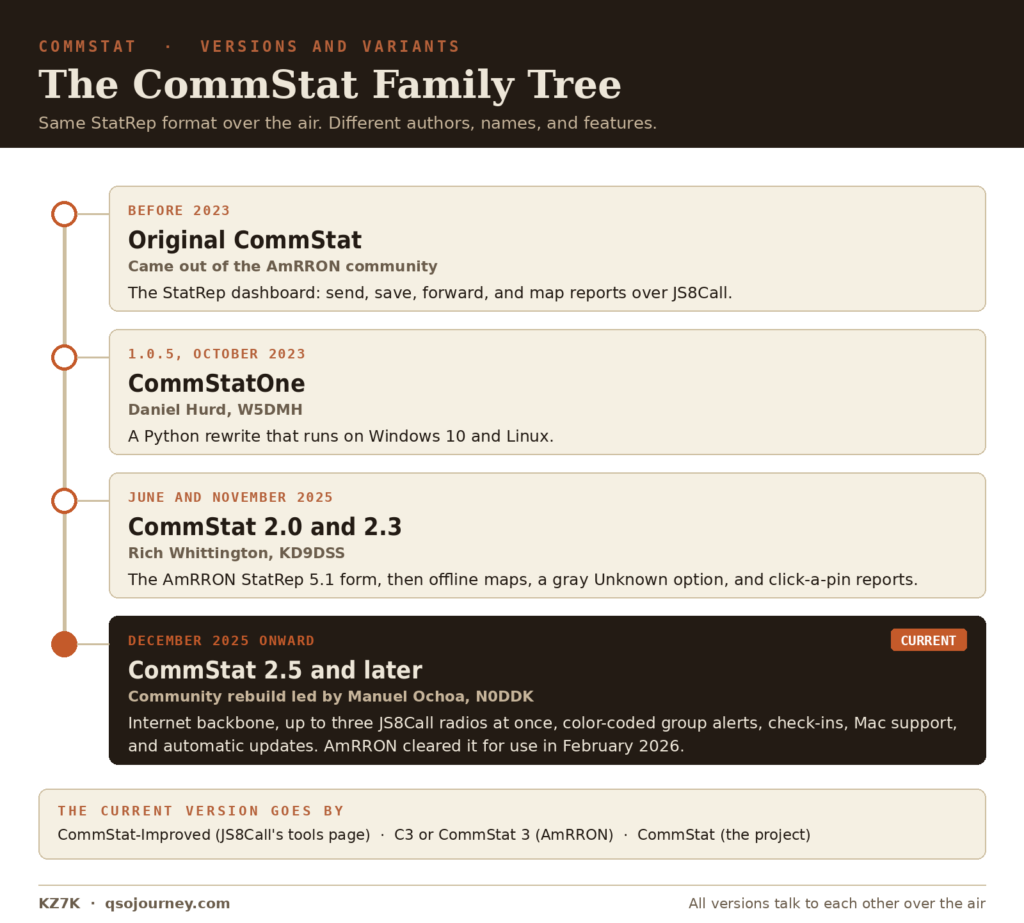
A few notes on the names. JS8Call’s own tools page lists the current version as CommStat-Improved. AmRRON calls it C3 or CommStat 3. The project itself just calls it CommStat, and the GitHub repository is under the CommStat organization. They are all the same program. If you see older CommStatX or CommStatOne repositories in search results, those are earlier branches and you should skip them for a new install.
The versions do talk to each other over the air, since it is all JS8 traffic in the same StatRep format. What older versions do not get is the backbone, so a station on 2.3 or earlier only sees what it hears on RF. Honestly, for drill purposes that is not the worst thing in the world.
Related Tools That Are Not CommStat
- JS8 Spotter: another JS8Call companion for tracking band activity, mapping stations offline, sending APRS messages, and automated replies. Good for monitoring, but not a StatRep board.
- FLDIGI and FLMSG: send structured forms, like a SitRep, over PSK, Olivia, and other modes. One station sends and everyone copies.
- Winlink: real email and ICS forms over HF, through gateways or peer to peer. Better for formal traffic to a specific recipient than for a group picture.
- VarAC: chat and a BBS over the VARA modem, handy for distributing files to a group.
None of these replace CommStat, and CommStat does not replace them. I keep notes on the rest of my software in Ham Radio Apps and Software Worth Having.
Practice It Before You Need It
Nobody learns new software in the middle of an emergency. If CommStat is going to be part of your plan, run it on a regular net now. Send a StatRep every week even when everything is green. Do at least one drill with the internet unplugged so you know what your RF network can really carry. And get JS8Call working first. If you are new to the mode, Getting Started with JS8Call picks up from setup to first contacts.
The software is the easy part. A group that agrees on a frequency, a group callsign, and a schedule, and actually shows up, is what makes CommStat worth running.