
Part of our Getting On The Air: Modes, Operations, and Making Contacts guide.
Most digital stations run a pile of separate programs. A decoder for FT8, a logger to record it, GridTracker or a mapper to see who is where, an alerter for new ones, and if your radio supports it, a panadapter app on top of all that. Each one has its own settings, and more than a few of them fight over the same COM port. Nexus, a free and open-source program from KD9TAW, tries to fold all of that into a single app with one log. I spent some time going through what it does and I think it is worth a look, with a few caveats.
What it actually replaces
Nexus decodes and transmits FT8, FT4, Q65, FST4, WSPR, RTTY, APRS, SSB, FM, and a handful of others, all sharing one CAT connection and one logbook instead of each mode living in its own app. The FT8 screen alone shows why that matters: a waterfall you can pause and scroll back through, a call roster ranked by what each station is worth to your log, and band activity carrying country, distance, and bearing on every decode.
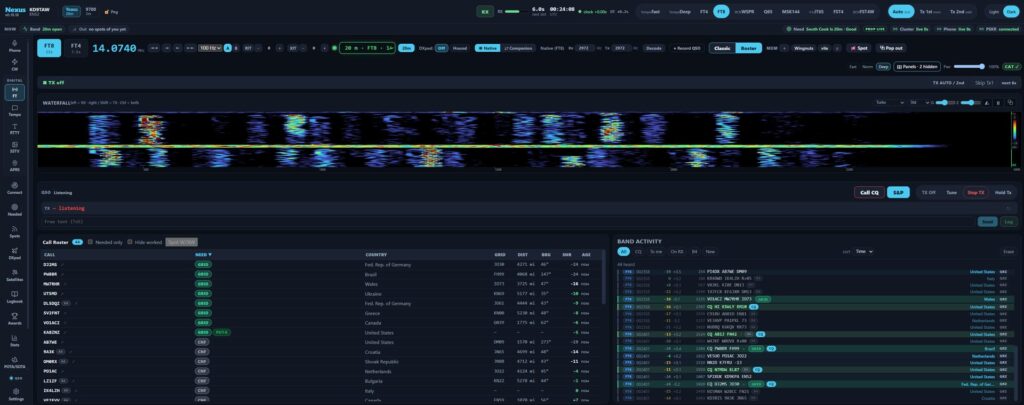
On native CI-V Icom radios like the IC-7300, it also pulls the rig’s own RF spectrum as a real panadapter instead of faking one from soundcard audio. If you already run WSJT-X and GridTracker, you do not have to rip that out to try it. Nexus keeps the same keyboard shortcuts and a byte-for-byte identical UDP protocol, so GridTracker and JTAlert keep working against it exactly like they do against WSJT-X. There is also a companion mode where Nexus rides a WSJT-X, JTDX, or MSHV decode stream while the other program keeps control of the rig, so you can test the logging and mapping side without touching your working setup.
Mapping and situational awareness
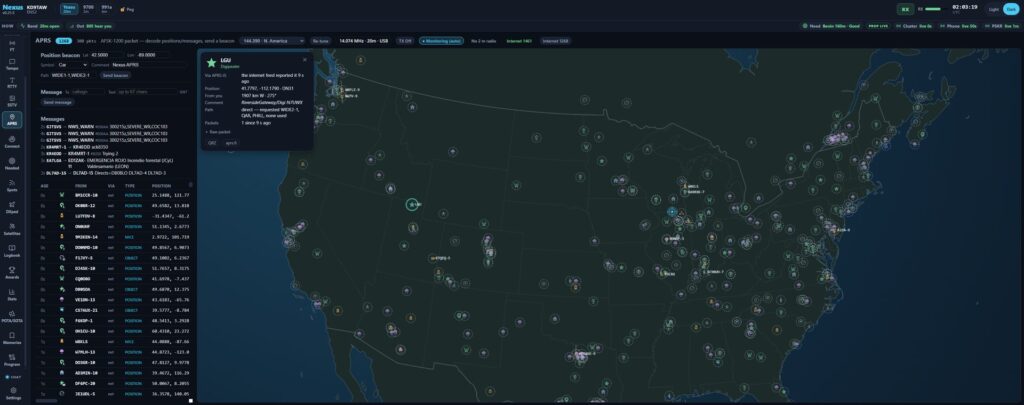
The APRS screen is one of the stronger surfaces here. It draws stations with real APRS symbols instead of generic dots, and clicking one opens a detail card with distance, bearing, and the digipeater path it took to reach you. When no 2 meter radio is attached, the readout says so instead of pretending to hear something it does not. For anyone who already leans on local nets and mapping tools for situational awareness, this is a clean way to keep an eye on APRS traffic without a separate app running in the background.
What sold me on it
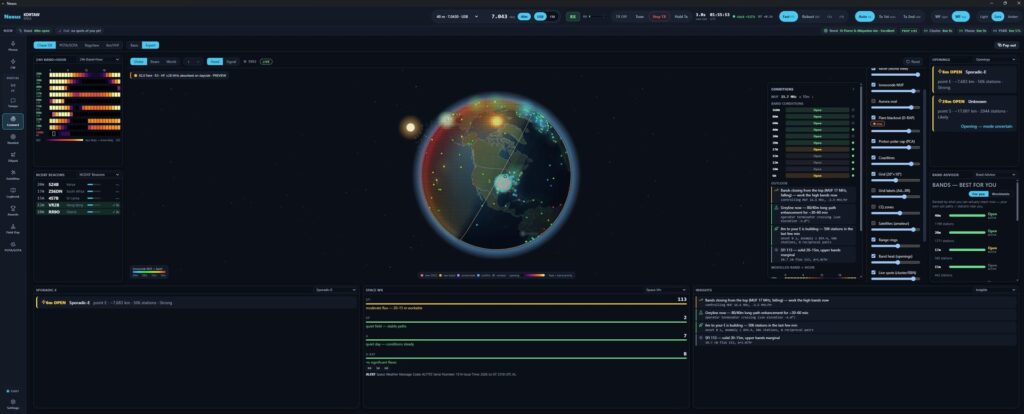
A few things stood out beyond the usual feature checklist. First, the propagation claims are honest about their limits. Every prediction is labeled modeled, and the developer is upfront that the openings engine reads other stations’ reports rather than your own antenna pattern, so it can tell you a path is open and still miss that your null is sitting on it. That kind of disclosure is rare in this hobby’s software.
Second, the accessibility work looks genuinely built in rather than bolted on. JAWS and NVDA support with nothing to switch on, keyboard navigation across the operating boards, and a CW cockpit built around a decode transcript rather than requiring you to hear the code. Operators who lose some hearing or some sight often get pushed off the air entirely, and it is good to see a program treat that as a design requirement instead of an afterthought.
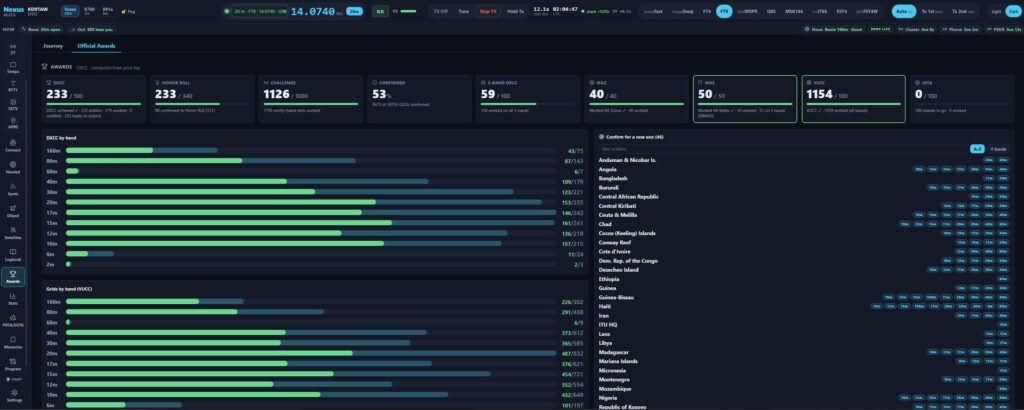
Third, the awards tracking runs entirely offline against your own log, no account or upload required, and it keeps track of where each confirmation came from. An eQSL or QRZ match shows as confirmed but does not count toward DXCC or WAS, because those awards do not accept it, so the totals you see are the ones that would actually survive a real award application.
Fourth, the transmit safety model matches how I want software touching my radio to behave. It opens read-only and commands nothing until you act, so a rig parked on a net frequency stays there. Your license class is a hard lockout in every keying path, and there is a watchdog covering beacon modes so nothing keys up unattended. For a program from a solo developer, that is a level of caution I appreciate.
Where it is still rough
This is a young, one-developer, open-source project, and it shows in a few places. The Windows installer is not code-signed yet, so SmartScreen throws an unknown-publisher warning on first run. There is no contesting support beyond Field Day, so if contesting is your main activity, N1MM+ is still the tool for that job, and Nexus will feed it contacts over UDP rather than replace it. The FlexRadio panadapter path is opt-in and not yet confirmed on real hardware, and the site is candid that field verification so far centers on Yaesu and native CI-V Icom rigs. None of that is disqualifying, but it is worth knowing going in.
Should you try it
If your logging setup is already a stack of separate programs talking to each other over UDP and CAT, Nexus is worth a weekend to try, especially through companion mode where it costs you nothing to test. If you are happy with Ham Radio Deluxe or one of the Log4OM or DXLab alternatives and you contest heavily, there is less reason to switch right now. It is free, it is GPL-licensed, and the developer is active on Discord and GitHub Issues if you run into trouble. I plan to keep an eye on it as it matures past v1.2.0.
Where to get it and get help
If you want to try Nexus yourself or run into trouble, here’s where to go:
- Discord, for live chat, setup help, and on-air reports
- Groups.io, the mailing list and forum for longer discussion, announcements, and searchable Q&A
- GitHub, source code, releases, and the canonical bug tracker
- SourceForge, project documentation and wiki
- QRZ, KD9TAW’s operator profile
- Email, kd9taw@protonmail.com