
Part of our Emergency Communications and Preparedness guide.
Picture the first night of a bad one. The power is out, the cell towers went quiet when their backup batteries did, and the internet is just a spinning icon. You are bugging in, which is usually the right call. The problem is you have no idea how big this thing is. Is it your town? Your county? Half the country? When is the power coming back, and is anyone even working on it?
Your neighbors do not know either. Your local repeater net, if the repeater is still up, is a room full of people who all know the same small slice of the story. Everyone inside the affected area is blind in the same way. The people who actually know what is going on are outside it, watching the news, and HF is the only radio in my shack that can reach them with no tower, no internet, and no infrastructure in between. Just a radio, a battery, and a wire.
It Has Happened: Hurricane Helene, 2024
This is not a movie plot. Helene made landfall near Perry, Florida, on September 26, 2024, as a Category 4 storm, then dumped catastrophic flooding inland. Rainfall near Asheville, North Carolina, was called a 1,000-year event. Power, cell service, and roads failed together, and nearly a week later cell dead zones still covered parts of the Carolinas.
For several days, radio communications were the only means of passing information.
ARRL News, October 2024
Before landfall, the Hurricane Watch Net fed surface reports to the National Hurricane Center. Afterward, hams ran pop-up health-and-welfare nets, moved email over Winlink, and kept mountaintop repeaters going on backup power. One ham read supply requests and road closures over the air and handed out radios to his neighbors. That is the whole idea of this post, done for real.
Why HF Is Different
VHF and UHF are line of sight. Handhelds, mobiles, GMRS, and repeaters are excellent across a neighborhood or a town, and they are what my family and team carry. But past the horizon they need something in the middle: a repeater on a hill, a linked system, an internet gateway. In a wide-area event, those are exactly the things that fail. I made that case in detail in Your Repeater Is Not a Plan.
| VHF / UHF | HF | |
|---|---|---|
| Reach | Line of sight. A neighborhood or a town. | The next county or the other side of the planet. |
| Past the horizon | Needs a repeater, a linked system, or an internet gateway. | The ionosphere is the repeater. |
| Upkeep | Site power, batteries, links, and a road to the hill. | Nobody has to fuel it or drive up a mountain to fix it. |
| Wide-area event | Those pieces are the first to fail. | Does not care whether the grid is up. |
| Who carries it | Family and team handhelds, vehicle mobiles. | At least one HF station on battery. |
HF uses the ionosphere as its repeater. Depending on the band, the time of day, and the antenna, the same radio can reach the next county or the other side of the planet. I think of HF as doing two jobs: NVIS for my region and DX for everything beyond it.

My main station lives in the shack: a Yaesu FTX-1 Optima and an Icom IC-7300 Mark II, set up side by side so I can monitor more than one band or frequency at the same time. That matters here, because I can sit on a regional NVIS net on 40 meters with one radio while the other watches 20 meters for stations outside the event. The FTX-1 Optima also covers VHF/UHF, so it is the bridge between what I learn on HF and the handhelds my family carries. When I need to leave the shack, a second FTX-1 rides in a go-box, and the Jeep has a Yaesu FT-891. One HF radio on battery is the minimum. Two lets you listen near and far at the same time.
NVIS: Your Region, No Skip Zone
Near Vertical Incidence Skywave means sending the signal almost straight up so the ionosphere drops it back down in a circle around you, roughly 300 miles in every direction with no skip zone. It works on the lower bands: 40 meters during the day, 80 meters at night, and 60 meters for the hours in between. I cover the details in What Is an HF NVIS Regional Net?
- Day, 40 meters: the critical frequency is at its highest, and absorption is lighter than on 80 meters.
- Night, 80 meters: the critical frequency falls after dark, and 40 meters starts skipping over nearby stations.
- In between, 60 meters: useful when 40 is too high and 80 is too noisy. The four channels stay at 100 W ERP (USB dial 5330.5, 5346.5, 5371.5, and 5403.5 kHz), and since February 13, 2026, General and up also have the 5351.5 to 5366.5 kHz segment at 9.15 W ERP. Details are on the ARRL 60 meter page.
Setting Up for NVIS
The antenna is the easy part: a plain horizontal dipole 10 to 30 feet off the ground. Low is the point. A low wire sends most of its energy straight up, which is what fills in that 300 mile circle. Masts, trees, or fence posts all work. Figure about 65 feet of wire for 40 meters and about 125 feet for 80 meters.

The rule of thumb for the band is simple: use the highest band that still reaches your closest stations. Here in Phoenix, sunrise moves from about 5:20 to 7:30 AM and sunset from about 5:20 to 7:45 PM over the year, so the switch points move with the seasons. In winter, and when the sun is quiet, drop to the lower band earlier. The clock is a starting point. Listen to who you can actually hear.

In a SHTF situation, NVIS answers the regional questions:
- How far does the damage go? Is the town 80 miles away powered, or dark like you?
- What is open? Roads, fuel, and stores within driving distance.
- Where is help? Shelters, distribution points, or an EOC operating nearby.
- How is your group? Status checks with your team, your club, or your ARES district.
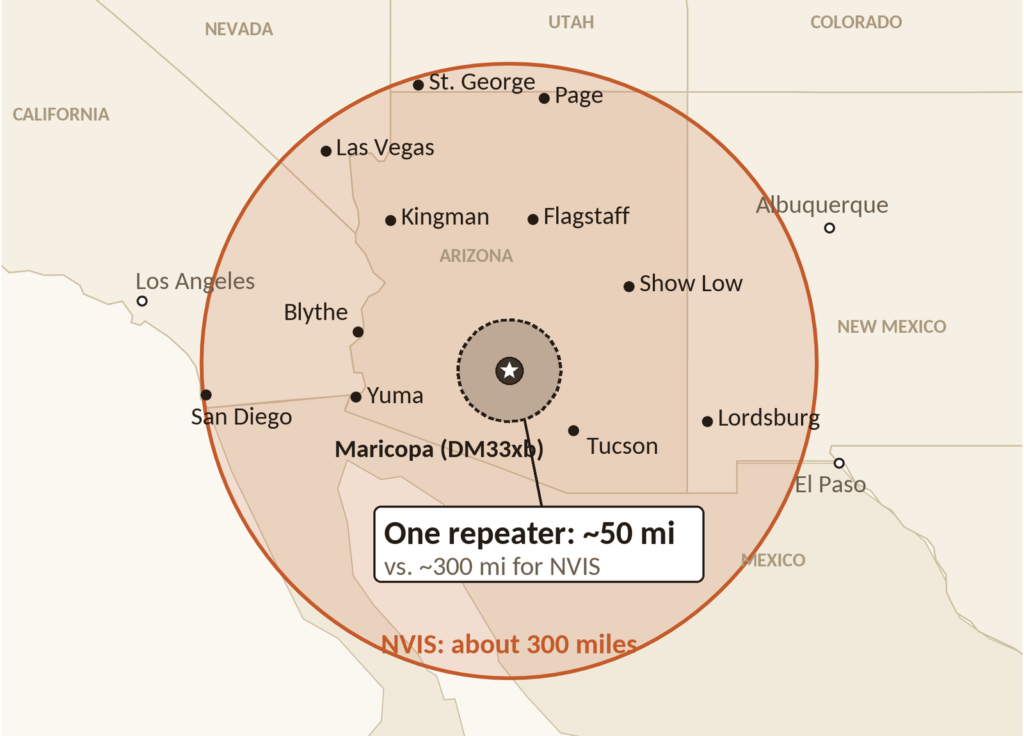
From my station in Maricopa (grid DM33xb), a 300 mile circle covers nearly all of Arizona, plus Las Vegas and San Diego at the edge. One mountaintop repeater covers about 50 miles. If Phoenix and Tucson are both dark but Flagstaff and Yuma are fine, I already know a lot about the shape of the event, and I learned it without a single piece of infrastructure.
HF DX: Borrowing Eyes Outside the Footprint
NVIS tells you about your region. But if your whole region is in the dark, everyone you reach on NVIS may be as blind as you are. That is where DX comes in. Go up in frequency, get the antenna higher, and the signal leaves at a low angle and skips hundreds or thousands of miles in a single hop, jumping right over a skip zone in between. (The antenna side of that trade is in NVIS vs. Vertical DX Antennas.) Now you are talking to someone whose lights are on, whose phone works, and who can read you the news.
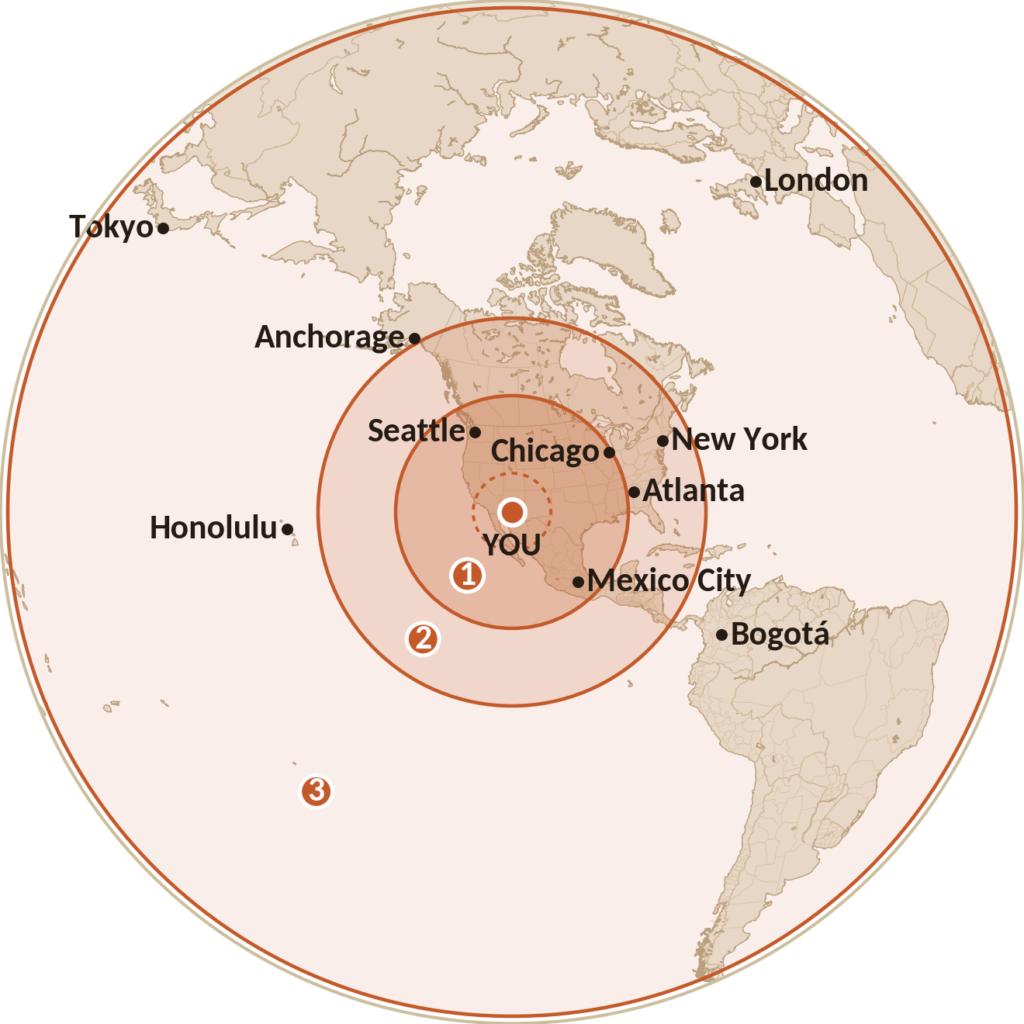
I think of it as polling in rings:
- Neighboring states (roughly 500 to 1,500 miles): 40 meters at night, 20 meters during the day. These stations can tell you how far the outage spreads and whether it reached them.
- Across the country (roughly 1,500 to 2,500 miles): 20 and 17 meters in daylight. A station on the other coast can tell you how the national news is covering it, what the federal response looks like, and whether this is one event or several.
- Other countries and continents (beyond 2,500 miles): 20, 17, and 15 meters, plus 10 meters when it opens. With Solar Cycle 25 past its peak, the high bands open less often than they did in 2024 and 2025, so 20 meters is the workhorse. If the event is big enough to lead the news in Europe or Japan, that alone tells you something about its scale.
How I Would Poll Other Regions, Step by Step
Listen First
Receiving barely touches the battery. An HF radio on receive draws about an amp, so you can listen for days on one battery, and it tells you who is out there before you say a word.
- Listen before you transmit. Run WSJT-X for a few minutes on FT8 (7.074 or 14.074 MHz). FT8 decodes without internet, and the decodes show you which regions are reaching you right now. If you are seeing the East Coast and Europe, you know where to point your questions.
- Check the time and broadcast stations. WWV on 2.5, 5, 10, 15, and 20 MHz gives a space weather update at 18 minutes past each hour, which tells you how HF should behave. Then sweep the shortwave broadcast bands for whoever is still on the air. International shortwave has shrunk a lot, so keep a printed schedule in your kit. You will not be looking it up online.
- Find the nets already working the problem. During hurricanes the Hurricane Watch Net runs on 14.325 MHz by day and 7.268 MHz at night, and the Maritime Mobile Service Net is on 14.300 MHz. In a big event, nets like these, plus ARES and traffic nets, carry real information about affected areas. Listen and log. Do not jump in unless you have traffic they need. More nets to know are in Cool HF Nets Worth Checking Into.
Then Transmit
- Ask a specific question. When you find a station clearly outside the event, tell them where you are and what you need: “This is KZ7K in Maricopa, Arizona. We have no power, phone, or internet here. Can you tell me what the news is reporting about the outage in the Southwest?” Then work through the follow-ups below.
- Ask more than one region. One station is a data point. Three stations in three different places who all heard the same thing is information.
- Go digital when voice will not make it. JS8Call decodes well below the noise at low power and can relay messages through other stations. Winlink over HF can reach a gateway outside the affected area and send and receive real email, including messages to family and replies from people who can look things up for you.
- Write it down. Time, frequency, call sign, location, and what they said. Rumors move fast after a disaster, and a log lets you sort what is confirmed from what is secondhand. The polling card has a box for each.
Keep it short. Say your piece, get the answer, and clear. Every transmission costs battery.
Check What You Hear
Rumors travel fast on a dark night. Sort every report before you pass it on:
- Confirmed: stations in three different regions report the same thing, each from their own source. Pass it on as confirmed, and say where it came from.
- Unconfirmed: one station, or several stations repeating the same broadcast or post. Log it, ask another region, and label it unverified if you relay it.
- Rumor: nobody can say where it came from, and it starts with “I heard that.” Do not relay it. Ask where they heard it, and move on.
Always ask, “Where did you hear that?” A broadcast, an agency, and their own eyes are three very different sources. Three stations repeating the same social media post is still one source.
What to Ask For
- Scope: which states, cities, or regions are affected, and roughly how many people.
- Cause: storm, grid failure, cyber attack, or something else. The cause tells you a lot about how long it will last, because each one points to a very different restoration time.
- Restoration: what utilities and carriers are saying about timelines for power, cell, and internet, if they are saying anything at all.
- Response: whether FEMA, the National Guard, or state agencies are deployed, and where shelters, water, and fuel are being handed out.
- Outside help: whether utility crews, mutual aid, or relief convoys are on the way, and roughly when they are expected.
- Roads and supplies: which highways and bridges are closed, and where fuel, water, and groceries are still available.
- Comms nearby: whether cell and internet work in neighboring areas, and which repeaters and nets are still active.
- What is coming next: weather, follow-on storms, or advisories for your area.
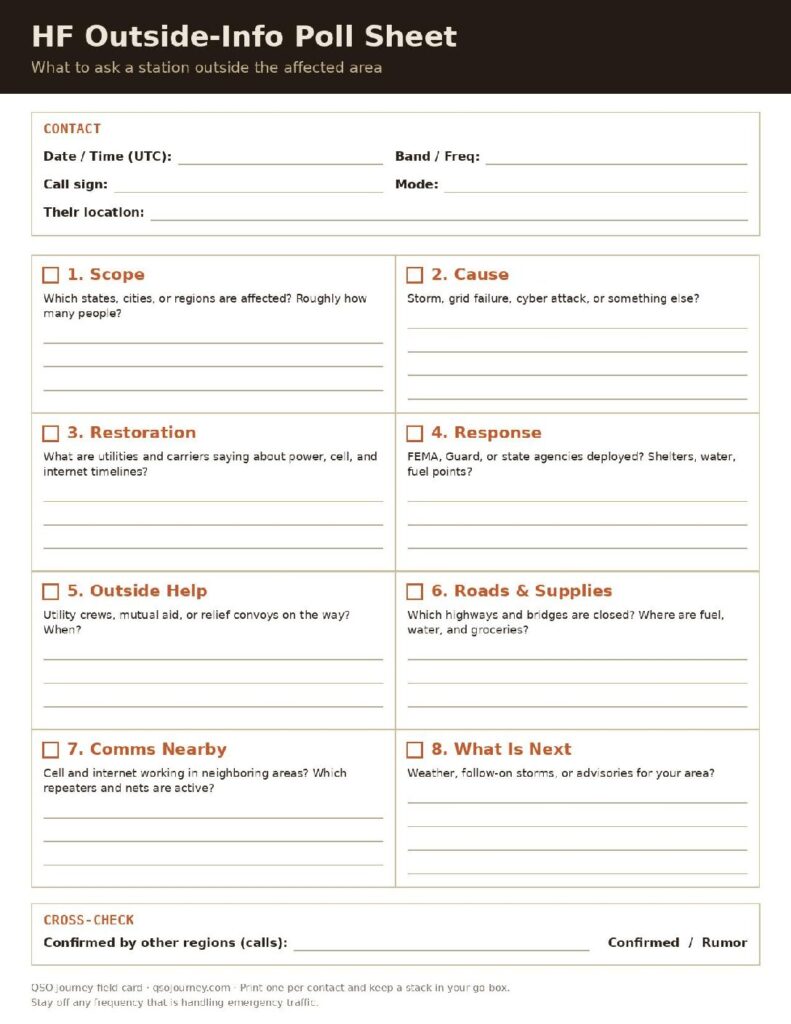
Print it: I turned this list into a one-page polling card with a contact log, all eight questions with room for the answers, and a cross-check box for confirmed or rumor. Download the HF Outside Polling Card (PDF). Print one per contact and keep a stack in your go-box.
Then Bring It Home
Whatever you learn on HF, pass it down to the people around you. The HF station learns what is happening outside the event, the local VHF/UHF or GMRS net passes it across town, and the family and neighborhood get the news. One HF station can be the news source for a whole neighborhood. This is where the bridge station earns its keep: the FTX-1 Optima takes in HF and puts it back out on VHF/UHF for everyone with a handheld.
Here is how that maps to the PACE plan my clubs use (MARA and CFAR):
- Primary: Sacaton Peak repeater N7ULY, 447.725 MHz, minus 5 MHz offset, PL 100.0.
- Alternate: 145.210 MHz simplex, no tone, no offset. No answer on Sacaton within 10 minutes means everyone moves here.
- Contingency: HF phone on 7.275 MHz LSB for the region and 14.275 MHz USB for long-haul.
- Emergency: HF digital on 7.115 MHz for the region and 14.115 MHz for long-haul.
The HF stations act as hubs on 40 meters and keep a second radio on 145.210 to relay for members without HF. More on building one of these is in my PACE communications plan guide.
CommStat: Your Group’s Status Board on HF
Polling the outside world is half the job. The other half is keeping track of your own people. That is where CommStat comes in. It is a companion app for JS8Call that turns ordinary JS8Call traffic into a status board for your group, and it is the tool I want running in the shack the moment the grid goes down.
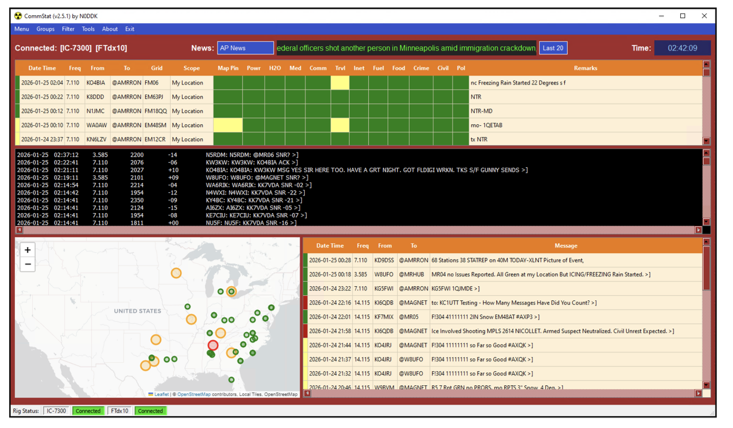
- Status reports by grid: each station sends a short status report tagged with its grid square, and CommStat lays them out so you can see at a glance who is fine and who needs help.
- Live traffic: JS8Call traffic scrolls by in real time, so you see what is going on as stations report in.
- Maps of stations reporting in: reports are plotted by grid square, which shows you where the trouble is and how far it reaches.
- Group messaging: one message reaches your whole group instead of going out station by station.
Reading CommStat at a Glance
There are three places to look. On the main board, each row is one station’s report, color coded across 12 categories: green is fine, yellow flags a concern, and gray means unknown. Click any row to open the full report, where the remarks explain why a category is yellow or gray. The message panel carries news relays, requests for information (RFI), and the replies that come back from stations near the area, and you will see traffic labeled as unverified so you know not to treat it as fact.
CommStat does not need the internet. It rides on JS8Call over the radio, so all it needs is your HF rig and a computer to run it on: a PC, a tablet, or a Raspberry Pi. That computer is part of your power budget, so plan for it. The catch is that nobody learns a new app in the middle of an emergency. CommStat is something you use and practice during normal times, on regular nets, so the screens and report formats are second nature when it counts. I cover how it fits alongside VarAC and FLDIGI on a regional net in What Is an HF NVIS Regional Net?
Power Budget: What One Battery Buys You
Here are approximate hours from one 100 Ah LiFePO4 battery (about 1,280 Wh) with a typical 100 watt HF rig at 13.8 volts. Check your own radio’s manual; an IC-7300 is rated at 1.25 amps max on receive and about 21 amps max on transmit.
| Load | Approx. draw | Hours on 100 Ah |
|---|---|---|
| Receive only | 1 A | ~100 h |
| Receive + Raspberry Pi (JS8Call, CommStat) | 1.6 A | ~60 h |
| Receive + laptop | 5 A | ~20 h |
| Digital at 30 W, key down | 8 A | ~12 h |
| SSB voice at 100 W, while talking | 10 A | ~10 h |
| Digital at 100 W, key down | 20 A | ~5 h |
Listening is cheap. The laptop and the transmitter are what drain the battery. SSB voice averages well under full power while you talk, but digital modes are key-down for the whole transmission, so turn the power down for JS8Call. A realistic evening of polling (ten hours of listening, half an hour of talking, and a few hours of a laptop) is around 30 amp-hours, so one 100 Ah battery covers a few days of that, and a solar panel stretches it.
The Minimum HF Kit
This is what lives in the go-box so you can do everything in this post. It is the floor, not the ceiling.
- HF radio: 100 W with SSB, plus a VHF/UHF or GMRS radio for the family.
- Battery: 100 Ah LiFePO4, fused, with a way to charge it.
- Wire antenna: an NVIS dipole or end-fed, rope, and a throw line.
- Tuner and coax: a tuner if the wire needs it, coax, and spare connectors.
- Solar panel: keeps the battery topped up when the grid does not.
- Pi or laptop: for JS8Call, Winlink, and CommStat. Count it in the power budget.
- Headphones: pull weak stations out of the noise and keep the house quiet.
- Paper: the frequency card, polling cards, a logbook, and pencils. When the laptop battery dies, paper still works.
Pack it now, then run the whole thing off the battery for a weekend before you ever need it.
The Frequency Card
Every frequency in this post on one page. Download the HF Frequency Card (PDF) and tape one inside the go-box lid.
| What | Frequency | Notes |
|---|---|---|
| Hurricane Watch Net | 14.325 / 7.268 MHz | Day / night |
| Maritime Mobile Service Net | 14.300 MHz | Daytime |
| WWV | 2.5, 5, 10, 15, 20 MHz | Space weather at :18 past the hour |
| FT8 (who can I hear?) | 3.573, 7.074, 14.074 MHz | USB dial |
| JS8Call | 3.578, 7.078, 14.078 MHz | USB dial |
| 60 m channels | 5330.5, 5346.5, 5371.5, 5403.5 kHz | USB dial, 100 W ERP |
| 60 m band segment | 5351.5 to 5366.5 kHz | General and up, 9.15 W ERP |
| NVIS bands | 40 m day, 80 m night | 60 m in between |
The Rules Still Apply
You need a General class license or higher for most of what is in this post. A Technician can listen anywhere and has some 10 meter voice privileges, but 40, 20, and 17 meter voice belong to General and up. Get the license now, because nobody is running exam sessions in a grid-down event. Start with Getting Licensed. Asking for news is ordinary amateur operating, and normal Part 97 rules apply. Part 97 does make room for emergency communication when life or property is in immediate danger and normal systems are unavailable, but that is for real emergencies, not a pass to ignore the rules because the internet is down. And if a net is handling emergency traffic, stay off its frequency.
Not General Yet? You Can Still Listen
Receiving needs no license at all, and Techs have a few HF privileges of their own:
- Shortwave receiver: a portable receiver with SSB hears ham nets, WWV, and international broadcasters covering the event.
- SDR and a wire: an SDR with HF coverage and a laptop decodes FT8, JS8Call, and CommStat traffic in receive, so you can see who is on the air and how your group is doing.
- Technician privileges: voice on 10 meters (28.300 to 28.500 MHz) when the band opens, data on 10 meters, and CW on parts of 80, 40, and 15 meters.
Practice It Before You Need It
Try this on a weekend. Disconnect from the internet and give yourself two hours with nothing but the HF radio. See how much you can learn about the world from the shack. Which regions could you hear? What news did you pick up? Who answered? Next time a hurricane threatens the Gulf, listen to the Hurricane Watch Net on 14.325 MHz by day or 7.268 MHz at night from wherever you are, and notice how much information moves through it. This is a skill like any other, and the time to build it is while the internet still works to check your answers.
NVIS keeps you connected to your region. DX tells you how big the problem is and what is being done about it. Together they turn a dark house into a station that knows what is happening, and that is why HF is a core layer of my PACE communications plan.
If you want proof this works, I collected a century of real cases, from 9/11 to Hurricanes Katrina, Maria, and Helene, in Why Ham Radio Matters: A Hobby, a Lifeline, and a Century of Proof.
Downloads From the Talk
If you scanned the QR code at the end of my talk, here is everything from it. Print the frequency card and a stack of polling cards, and keep them with the radio.